
How to Use This Guide
Most shop lighting problems trace back to three mistakes: not enough total lumens, the wrong color quality, and fixtures placed so they create shadows where you need to see most. Budget roughly $35–60 per fixture for a quality 4-foot LED bar — a Barrina T8 4-pack runs about $45 on Amazon, an Honeywell 5500-lumen LED shop light is closer to $50 per unit, and contractor-grade strips from Lithonia hit $60–80. A typical two-car garage needs 8–10 fixtures, so plan on $300–600 in lights. This guide covers all three mistakes.
- Buying fixtures for a new or upgraded shop: Start at Part 1, work through Part 4.
- Have fixtures, want to plan layout: Go directly to Part 5.
- Have lights but still have eye strain or shadows: Head to Part 8.
- Need to wire new lights: See Part 7.
LED Workshop Lights at a Glance
A 400 sq ft two-car garage needs roughly 40,000 lumens — about 10 four-foot LED bars. Buy 4000K at 90+ CRI for the whole shop, and 95 CRI specifically at the finishing station. Put the lights on a dedicated circuit, space them in a grid with at least 30% beam overlap, and never place a fixture directly above the table saw blade.
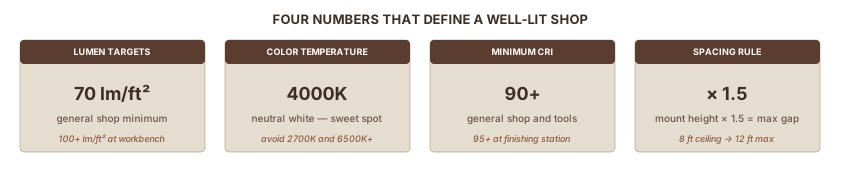
| Target lumens | 70 lm/sq ft general; 100+ at workbench |
| Best color temp | 4000K for woodworking; 5000K acceptable for mixed-use shops |
| Minimum CRI | 90+ general; 95+ at finishing station |
| Fixture spacing rule | Mount height × 1.5 = max distance between fixtures |
| LED vs. fluorescent lifespan | 25,000–50,000 hrs vs. 7,000–15,000 hrs |
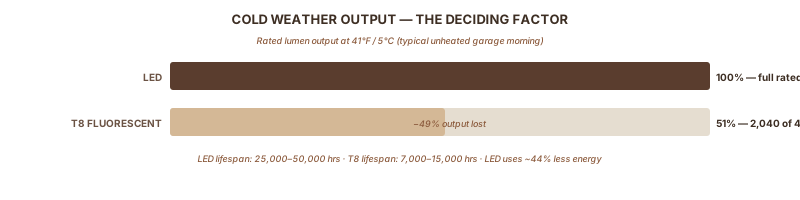
| Cold weather | Fluorescent loses 49% at 41°F; LED delivers full output |
In this guide:
- How much light your shop actually needs
- CRI and color temperature — the specs that matter most
- LED vs. fluorescent
- Fixture types and what to buy
- Layout that eliminates shadows
- Task and bench lighting
- Power and installation
- Six mistakes that wreck shop lighting
Part 1: How Much Light Your Shop Actually Needs
The typical garage shop runs on 4,000–8,000 total lumens. A two-car garage needs five times that. This mismatch is why shops feel dim even after a "lighting upgrade."
The IES (Illuminating Engineering Society) recommends a minimum of 50 lumens per square foot for workshop spaces. For woodworking — reading grain direction, chiseling to a knife line, evaluating a finish — target 70 lumens per square foot for general areas, 100 lumens or more at the workbench. One foot-candle equals one lumen per square foot, so the terms are interchangeable.
The Calculation
According to Hyperlite's IES-based garage lighting guide, the formula accounts for ceiling height, wall reflectance, and fixture efficiency losses:
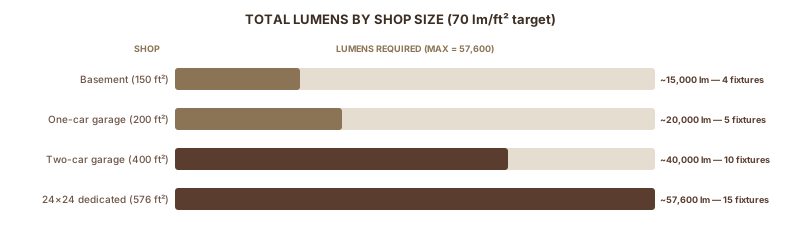
Total lumens needed = Area (sq ft) × 70 ÷ 0.7
| Shop | Area | Total Lumens (70 lm/sq ft) | 4-ft bars at 4,000 lm each |
|---|---|---|---|
| One-car garage | 200 sq ft | ~20,000 | 5 |
| Two-car garage | 400 sq ft | ~40,000 | 10 |
| 24×24 dedicated shop | 576 sq ft | ~57,600 | 15 |
| Basement shop | 150 sq ft | ~15,000 | 4 |
These are starting points. Dark walls, high ceilings, or heavy finishing work: add 20–30% to the fixture count.
The "Still Seems Dark" Problem
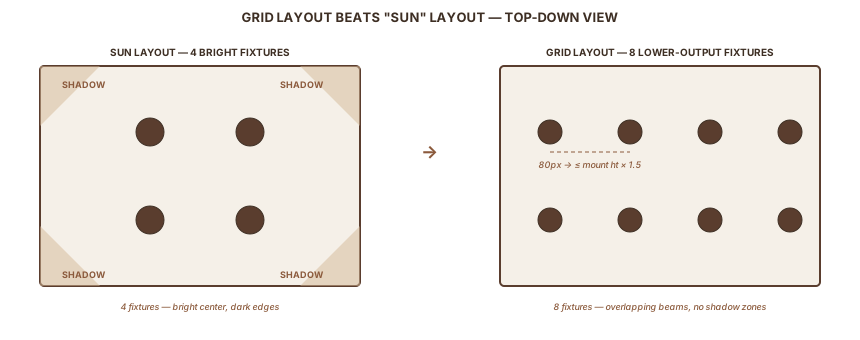
Four high-output fixtures create four bright pools with dark zones between them. Eight lower-output fixtures in a grid cover the same area with no shadow zones. More fixtures at lower wattage always beats fewer fixtures at high wattage. The layout that makes this work is in Part 5.
Part 2: CRI and Color Temperature
Two specs on the box matter more than lumens for woodworking accuracy: CRI and Kelvin. Most buyers ignore both and sort by price. That's why they end up with lights that make walnut look like oak and stain that looks fine in the shop but wrong in daylight.
CRI — Whether Your Light Tells the Truth About Wood Color
CRI (Color Rendering Index) measures how accurately a light source renders colors compared to natural sunlight. The scale runs 0–100, where 100 is perfect. A 70 CRI light makes colors look different than they actually are.
For finishing work, this is concrete. Under 70 CRI shop lights, a woodworker selects a stain that looks perfect in the shop — then carries the piece to a window and finds an orange cast they didn't see. The stain didn't change. The light lied.
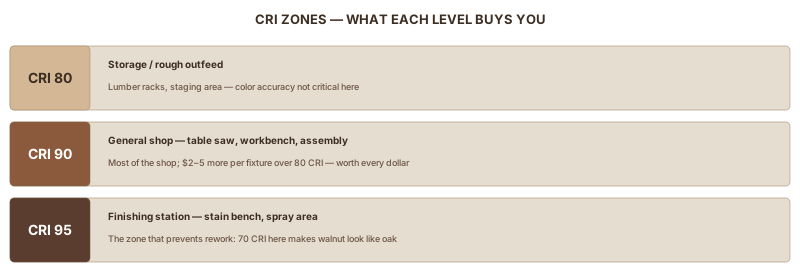
The practical breakdown, based on Workbench Test Lab's CRI testing for precision woodworking:
| Zone | Minimum CRI | Examples |
|---|---|---|
| Storage, rough outfeed | 80 | Lumber racks, staging area |
| General assembly, table saw, router | 90 | Most of the shop |
| Finishing station, stain sampling | 95+ | Spray area, stain bench |
Buy 90+ CRI for everything. The price difference between 80 and 90 CRI is $2–5 per fixture. At the finishing station, spend specifically on 95. That's the one zone where accurate color prevents rework.
Color Temperature — Which Kelvin to Buy
Color temperature (Kelvin) sets the tint: warmer numbers look amber, cooler numbers look white or blue.
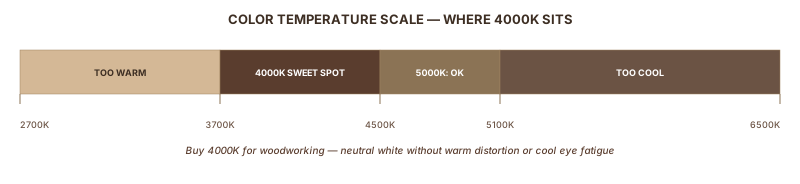
| Kelvin | Appearance | For Woodworking? |
|---|---|---|
| 2700K | Warm amber (like incandescent) | No — distorts wood undertones |
| 3000K | Soft white | No — too warm for finish assessment |
| 4000K | Neutral white | Yes — the woodworking sweet spot |
| 5000K | Daylight white | Acceptable — slight blue cast; fine for precision |
| 6000K+ | Cool/blue-white | No — eye fatigue on long sessions |
Buy 4000K. The woodworking community has debated this for years on Sawmill Creek, LumberJocks, and Fine Woodworking forums, and Target Coatings' woodshop lighting guide confirms the consensus: 4000K provides accurate color rendering without the blue cast that distorts stain and finish assessment.
5000K works if your shop also handles metalwork or automotive jobs where crisp white light matters more than finish color accuracy. For wood: 4000K.
RELATED: Applying Polyurethane CRI matters when evaluating brush marks and sheen uniformity between coats.
Part 3: LED vs. Fluorescent
Keep working fluorescents if you have them and they're relatively new. For any new installation, buy LED. Here's the comparison:
| Feature | LED | T8 Fluorescent |
|---|---|---|
| Lumen output | 100–130+ lm/W | 80–100 lm/W |
| Lifespan | 25,000–50,000 hrs | 7,000–15,000 hrs |
| Cold weather | Full output at -4°F and below | Loses 49% at 41°F; ~80% at -20°C |
| Warm-up | Instant | Slow start; flickers in cold |
| Energy | ~44% less than fluorescent | Baseline |
| High CRI options | Widely available, affordable | Exists but limited selection |
The cold-weather performance gap settles this for most North American woodworkers. According to PacLights' LED vs. fluorescent comparison, T8 fluorescent tubes lose up to 49% of their lumen output at 41°F. At -20°C, the loss reaches 80%. A 4,000-lumen fluorescent fixture drops to 2,000 lumens on a cold morning. LED delivers the same output at -4°F as at 70°F.
For any garage that drops below 50°F for more than a few months a year, the fluorescent-to-LED switch pays for itself in recovered light output alone.
Part 4: Fixture Types
The right fixture type depends on ceiling height and shop size.
| Fixture | Lumens Each | Best For | Notes |
|---|---|---|---|
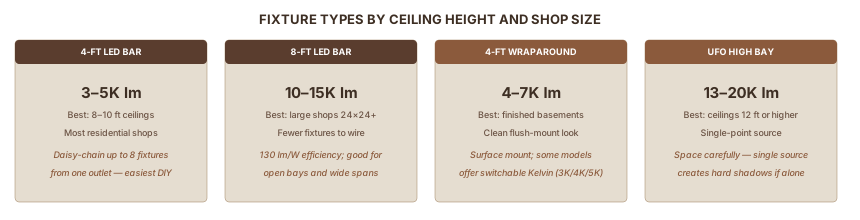
| 4-ft LED bar (linkable) | 3,000–5,000 | 8–10 ft ceilings; most shops | Daisy-chain with jumper wires; easiest DIY install |
| 8-ft LED bar | 10,000–15,000 | Large shops (24×24+) | Fewer fixtures to wire |
| 4-ft wraparound | 4,000–7,000 | Finished basements; clean-look install | Surface mount; switchable K models available |
| UFO high bay | 13,000–20,000 | Ceilings 12 ft or higher | Single-point source; space carefully to avoid shadows |
| T5/T8 fluorescent | 3,000–5,000 | Existing installs only | Cold weather limits new installs |
What to Read on the Spec Sheet
Manufacturers compete on watts. You want lumens. When comparing fixtures, check:
- Lumens — total light output, not watts
- CRI — 90+ is the target; ignore "high CRI" claims without a number
- Kelvin — 4000K for woodworking; avoid 6500K
- IP rating — IP54 or higher keeps dust out of the fixture in a shop environment
Product Examples
These fixtures appear across woodworking forums because they deliver usable lumens, decent CRI, and reasonable prices. They're starting points, not the only options:
- Commercial Electric 4-ft linking shop light: 7,000 lumens, 4000K. Available at Home Depot; recommended across Fine Woodworking forums.
- Hykolity 8-ft LED shop light: 14,300 lumens at 110W (130 lm/W efficiency), 5000K. Good value for large open shops where you can run fewer fixtures.
- Barrina 4-ft T8 integrated LED: 2,500 lumens, available in 5000K and 6500K — buy the 5000K version. Check the spec sheet for a CRI number before buying.
Part 5: Layout and Fixture Placement
Having enough total lumens matters. Where you put them matters just as much.
The Spacing Rule
Maximum distance between fixtures = mounting height × 1.5
| Ceiling Height | Max Fixture Spacing |
|---|---|
| 8 ft | 12 ft |
| 9 ft | 13.5 ft |
| 10 ft | 15 ft |
| 12 ft | 18 ft |
For most residential garages with 8–9 ft ceilings, fixtures should be no more than 12–13 ft apart. In a 20×20 garage, that means at least two rows of fixtures running the length of the shop.
Grid Beats "Sun" Layout
Four high-output fixtures placed in the corners of a 400 sq ft shop produce four bright zones and dark shadows between them. Eight lower-output fixtures in a 4×2 grid produce overlapping light cones — every point in the shop gets illumination from at least two directions.
Adjacent beam patterns should overlap by at least 30% at the task plane (workbench height). Most 4-ft LED bars achieve this at the spacing the rule above produces. The Hyperlite workshop layout guide makes the case clearly: the grid approach eliminates the dark zones that task lighting can't compensate for.
Fixture Orientation
Run fixtures parallel to your main workbench, not perpendicular. Parallel orientation reduces direct glare and maximizes vertical illumination on the faces of tools and workpieces. Place the first row directly above the front edge of your primary workbench.
Table Saw Placement
No fixture goes directly above the blade. Overhead light casts a shadow from the riving knife, blade guard, and fence exactly at the cut line.
Better position: one fixture on the outfeed side of the blade, slightly behind it from the operator's standing position. This backlights the cut line rather than shadowing it.
RELATED: Table Saw Fence Visibility at the cut line is part of kickback prevention — a well-lit blade and a true fence work together.
The Free Lumens Trick
One row of fixtures 18–24 inches from a light-colored wall bounces light back into the shop. Popular Woodworking's shop lighting planning guide calls wall reflectance one of the most underused tools in shop lighting design. Paint walls white or light gray — it's free lumens.
Part 6: Task and Bench Lighting
Overhead lighting covers 90% of shop work. Three situations call for a supplement:
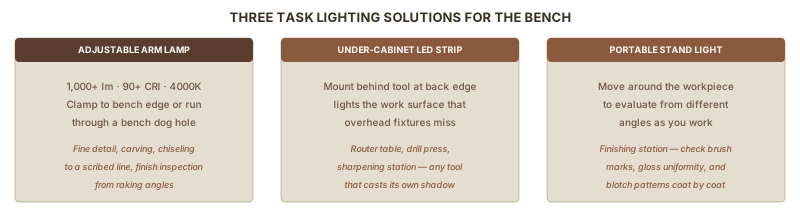
- Fine detail — carving, inlay, reading marking gauge lines, chiseling to a scribed line
- Finish evaluation — checking brush marks, gloss uniformity, and blotch patterns requires movable directional light at different angles
- Sharpening — seeing a wire burr or hollow grind requires a focused beam at a specific angle
What to Use
An adjustable arm lamp with 1,000+ lumens, 90+ CRI, and 4000K covers most supplemental lighting needs at the bench. Mount it at the bench edge with a clamp, or through a bench dog hole using a lamp bushing. The articulating arm lets you position the light exactly where you need it — directly at the marking gauge line or raking across a finish surface to catch irregularities.
For mounted tools that cast their own shadow (router table, sharpening station), an under-cabinet LED strip behind the back of the tool lights the work surface that overhead fixtures miss.
A portable LED work light on a stand works well at the finishing station, where evaluating a coat from different angles requires moving the light source around the piece.
For a standard 4–8 ft workbench: 3,000–5,000 lm of overhead plus a 1,000-lumen task lamp covers virtually all bench work.
Part 7: Power and Installation
Wire Lights to a Dedicated Circuit
Wire your shop lights to a dedicated 20-amp circuit, separate from your tools. When a table saw motor starts, it draws 3–5× its running current as an inrush surge. Lights on the same circuit dim for that instant. Reduced visibility during blade spin-up is a safety problem, not an inconvenience.
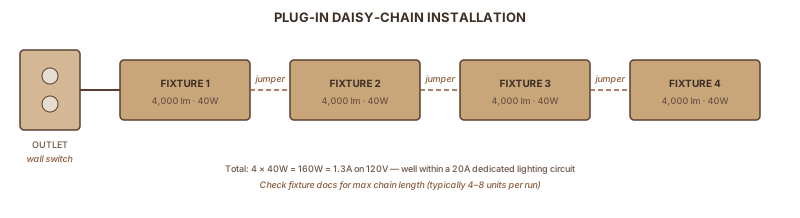
The math is reassuring: 8 × 40-watt LED fixtures = 320 watts = 2.7 amps on a 120V circuit. Lights barely touch a 20-amp circuit. Any shop with a subpanel can dedicate one circuit to lighting at essentially no cost.
Installation Options
Plug-in with jumper wires is the easiest approach. Most 4-ft LED bars include short jumper wires to link fixtures. Run one power cord to an outlet, daisy-chain up to 4–8 fixtures from it (check your fixture's stated maximum), and the outlet's wall switch controls everything. No electrical knowledge required. ToolGuyd's garage lighting wiring walkthrough documents exactly how a typical plug-in chain installation works.
Hardwired fixtures connect directly to ceiling junction boxes, with no visible cords. Cleaner installation, same light output. Requires basic household wiring comfort or a licensed electrician. Adding new circuits needs an electrical permit in most jurisdictions; replacing existing fixtures typically doesn't.
Most 4-ft LED bars hang on chains at adjustable height, or flush-mount by screwing into ceiling joists. Chain mounting lets you lower fixtures closer to the work surface in shops with high ceilings.
Subpanel Planning
If you're wiring a shop subpanel from scratch:
| Panel | What It Handles |
|---|---|
| 60-amp | Lighting circuit + 20A tools + dust collection + one 240V machine |
| 100-amp | All of the above + more 240V machines + future additions |
Per NEC, all garage receptacles require GFCI protection. Most plug-in shop light setups use the same GFCI-protected outlets as tools, so this is usually already covered. Popular Woodworking's workshop electrical guide walks through the full amp calculation for stationary tools if you're sizing a panel from scratch.
Part 8: Six Mistakes That Kill Shop Lighting
These come up in every forum thread on shop lighting, usually after someone has already bought the wrong thing.
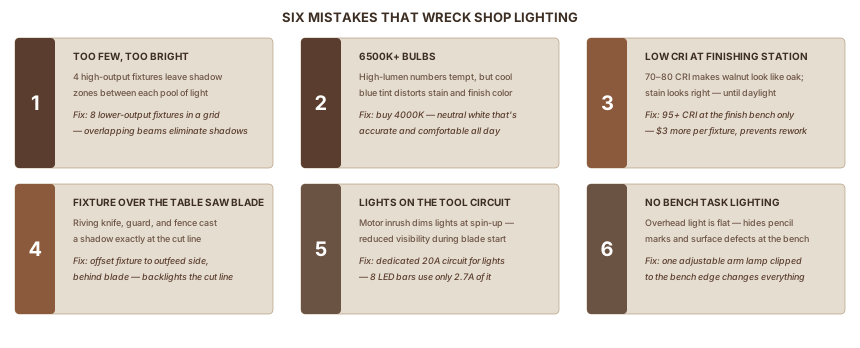
1. Too few, too bright Four 12,000-lumen fixtures leave shadow zones between each light that eight 6,000-lumen fixtures in a grid wouldn't have. The fix isn't a brighter fixture — it's more fixtures at lower wattage, spaced in a proper grid.
2. 6000K+ bulbs The lumen numbers tempt, but extended sessions under 6000K cause eye fatigue and the cool blue tint makes stain and finish color assessment unreliable. Buy 4000K.
3. Low CRI at the finishing station Even at the right lumen level, 70–80 CRI at the finish bench means color decisions are based on distorted light. Spend the extra $3 per fixture for 95 CRI at that specific station.
4. Fixture directly over the table saw blade The blade, riving knife, and guard cast a shadow straight down from an overhead fixture. Offset the nearest fixture to the outfeed side, behind the blade from where you stand.
5. Lights on the tool circuit Motor inrush from a table saw or router dims lights on the same circuit. The momentary light drop is a visibility problem during spin-up. Separate circuits.
6. No bench task lighting Overhead lighting is flat. It illuminates a horizontal surface but hides surface defects, pencil marks, and fine joinery fit by removing raking shadows. One adjustable arm lamp at the bench changes what you can see.
FAQ
How many lumens does a two-car garage shop need?
A 400 sq ft two-car garage needs roughly 28,000–40,000 total lumens — that's 70 lm/sq ft as a baseline, or 100 lm/sq ft if you're doing fine joinery or finishing work. For LED shop lights producing 4,000–5,000 lumens per fixture, plan on 8–10 four-foot bars. Don't trust the "single 5,000-lumen fixture for the whole garage" marketing on big-box LED packaging — one fixture is roughly an eighth of what the space actually needs.
Is 4000K or 5000K better for a workshop?
4000K (neutral white) is the better choice for woodworking. It renders wood grain and stain colors close to how they'll look in daylight without the harsh blue-white cast of 5000K. 5000K is acceptable for general-purpose shops doing metal or auto work, but stain matching becomes harder. Avoid 2700K and 3000K (warm yellow) entirely — they flatten grain contrast and shift stain perception toward red. The Sawmill Creek and Fine Woodworking forums are unanimous on 4000K for finishing stations.
Can I daisy-chain LED shop lights on a regular outlet?
Yes, up to the chain limit on the box (usually 4–6 fixtures) and within the circuit's amp rating. A typical 4-foot LED bar draws 30–50 watts, so a 15-amp circuit at 1,800 watts can safely run 30+ fixtures. The actual limit is usually the daisy-chain spec from the manufacturer (Barrina caps at 8 fixtures linked, Honeywell at 4–6). For a permanent installation, hardwire to a dedicated 20-amp circuit instead of relying on plug-in chains.
Why does my LED shop look fine until I'm at the workbench?
Overhead-only lighting creates flat shadows on a horizontal work surface. Even with adequate lumens, you can't see pencil marks, scratch marks, joinery fit, or surface defects when the light is straight down. The fix is task lighting — one adjustable-arm LED lamp aimed at the bench at a low angle. Raking light from the side reveals every imperfection. A $25 IKEA Tertial lamp or a $40 LED magnifier lamp solves this entirely.
Do LEDs work in cold garages?
Yes, and they outperform fluorescent in the cold. Fluorescent T8s lose roughly 49% of their output at 41°F (5°C) and may not start at all below freezing. LEDs deliver full output regardless of temperature — they actually run more efficiently in cold air. If your shop is unheated and you live anywhere with real winter, this alone justifies switching from fluorescent.
Sources
This guide draws on IES lighting standards, manufacturer technical data, finishing industry sources, and community discussions from Fine Woodworking, Sawmill Creek, LumberJocks, and ToolGuyd.
- Popular Woodworking: Planning Shop Lighting — layout principles and wall reflectance
- Target Coatings: LED Woodshop Lighting — CRI and color temperature for finishing work
- Hyperlite: Calculate Lumens for Garage Lighting — IES-based lumen calculation formula
- PacLights: LED vs. Fluorescent T8 Comparison — cold-weather performance data
- Workbench Test Lab: CRI and Placement for Woodworking — CRI zone recommendations by task
- Sawmill Creek: Lighting Priorities thread — woodworker priority debate
- Hyperlite: Workshop Layout to Eliminate Shadows — fixture spacing and grid layout
- ToolGuyd: Garage Workshop Lighting Wiring — real-world plug-in install
- Popular Woodworking: Calculating Electrical Usage — amp calculations for shop wiring
- Prairie Electric: Garage Workshop Wiring Guide — professional wiring guidance
- Fine Woodworking forum: Shop Lighting Suggestions — woodworker fixture recommendations
- Jay's Custom Creations: Fluorescent to LED Upgrade — real shop upgrade comparison
- Toolstash: Workshop Lighting Design Guide — fixture placement strategy
- Woodworking by LPI Custom: Lighting Mistakes — common failures and fixes
- 1st Source Lighting: Footcandle Guide — IES recommended levels
Also Referenced