
Cut at an Angle at a Glance
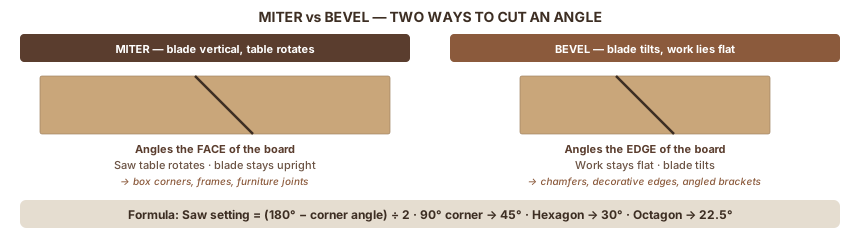
When two pieces of wood meet at a corner, each gets cut at half the corner angle. For a 90° corner, set the saw to 45°. A miter cut angles the face of the board; a bevel cut angles the edge. Learn the formula, measure angles three different ways, and always test on scrap first.
| Miter vs bevel | Miter = face angle (blade vertical, work rotates) · Bevel = edge angle (blade tilts) |
| Core formula | Saw setting = (180° − desired corner angle) ÷ 2 |
| 90° corner | Set saw to 45° |
| Hexagon corner | Set saw to 30° |
| Octagon corner | Set saw to 22.5° |
| Polygon shortcut | Saw setting = 180° ÷ number of sides |
In this guide:
- What kind of cut you need — miter, bevel, or compound
- How to calculate the cutting angle for any corner
- Three ways to find an angle you can't calculate
- Saw setup — miter saw, table saw, circular saw
- Test cuts and reading the gap
Part 1: Miter, Bevel, and Compound Cuts Explained
Your miter saw has two angle adjustments: a knob that rotates the table and a lever that tilts the head. They do different things, and knowing which one to reach for saves a lot of confusion.
What a miter cut is
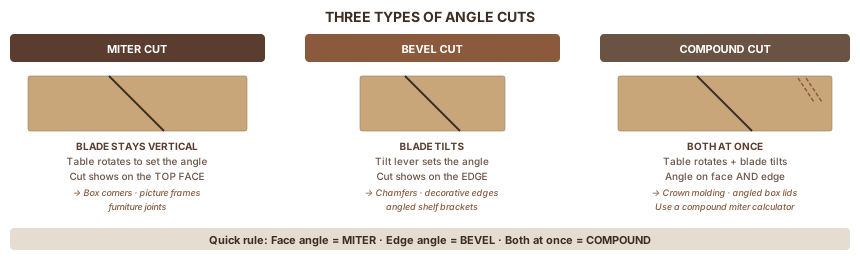
A miter cut angles the face of the board. The blade stays vertical. The work rotates on the saw table.
The result: an angled surface across the width of the board. For a 90° box corner, each piece gets a 45° miter. The cut hides the end grain and produces a clean corner.
The rotating table controls this. The dial reads in degrees from square: 0° means a straight 90° cross-cut, 45° means the work is rotated 45° from the fence.
What a bevel cut is
A bevel cut angles the edge of the board. The blade tilts. The work lies flat.
The result: an angled surface through the thickness of the board. Used for decorative edges on tabletops, chamfered (angled) furniture legs, angled shelf brackets, and parts of crown molding.
The tilt lever controls this. Most saws bevel 0° to 45° in one or both directions.
What a compound cut is
A compound cut uses both adjustments at once. The blade tilts and the work rotates simultaneously. This creates an angled surface on both the face and the edge in one pass.
Crown molding requires a compound cut. So do angled box lids and furniture legs that rake outward at a slope. The math involves both a miter angle and a bevel angle working together. For most beginners, that means using a calculator (covered in Part 5).
Quick rule: If the angle shows up on the face (top surface) of the board, that's miter. If it shows up on the edge (through the thickness), that's bevel.
Part 2: Calculating the Cutting Angle
You want a 90° corner. What do you set the saw to?
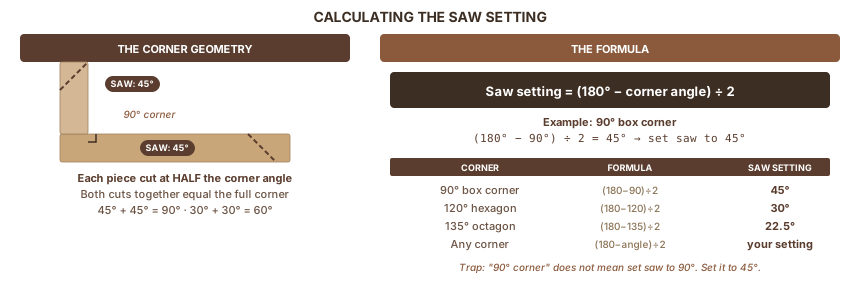
Not 90°. On a miter saw, 90° on the dial means 90° from the fence, which would make the blade nearly parallel to the work. You need 45°. Each piece gets cut at half the corner angle, because the two cuts together add up to the full corner.
The formula
Per Omni Calculator's miter angle reference, the saw dial setting for equal-width boards of the same material is:
Saw dial setting = (180° − desired corner angle) ÷ 2
For a 90° corner: (180 − 90) ÷ 2 = 45°
For a 120° corner (two hexagon pieces): (180 − 120) ÷ 2 = 30°
For a 60° acute corner: (180 − 60) ÷ 2 = 60°. Most miter saws top out around 45–52°. You'd need a table saw or a jig for that one.
Why the formula works
Press two 45° miter cuts together. The corner they form is 90°. The two cuts add up to the full corner angle, so each cut is exactly half. This holds for any corner angle.
The beginner trap: someone measures a corner with a protractor, reads "90°," and sets the saw to 90°. But 90° on the miter dial means 90° from square: a cut running nearly parallel to the fence. Half of 90° is 45°. That's the number you want.
Common angle reference
| Want this corner | Set saw to | Where used |
|---|---|---|
| 90° right angle | 45° | Boxes, frames, furniture corners |
| 120° corner | 30° | Hexagon shapes |
| 135° corner | 22.5° | Octagon shapes |
| 108° corner | 36° | Pentagon shapes |
| Any angle | (180° − angle) ÷ 2 | Universal formula |
Polygon shortcuts
For any regular polygon (all sides equal, all angles equal), the saw setting follows one formula:
Miter saw setting = 180° ÷ number of sides
| Sides | Saw setting | Example use |
|---|---|---|
| 4 | 45° | Boxes, frames |
| 5 | 36° | Pentagon shelf |
| 6 | 30° | Hex mirror, hex shelf |
| 8 | 22.5° | Octagon frame, octagon table |
| 10 | 18° | Decorative polygon frames |
| 12 | 15° | Circular decorative frames |
Part 3: Three Methods to Find Any Angle
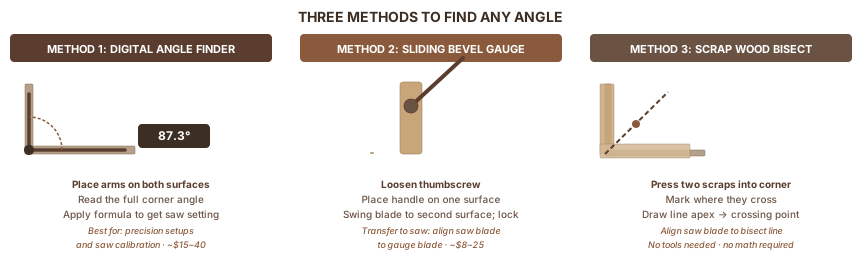
The formula works when you know the desired corner angle. But sometimes you don't. You're fitting trim in an out-of-square room, or matching an angle on an existing piece. Three methods cover every situation.
Method 1: Digital angle finder (~$15–40)
A protractor-style digital finder has two arms that pivot at a shared point. Open the arms, place one on each surface of the corner, and read the display.
- Place one arm flat on the left wall (or surface) of the corner.
- Swing the other arm flat against the right wall.
- Read the full corner angle (e.g., 87.3° for a wall that's slightly off square).
- Apply the formula: saw setting = (180° − 87.3°) ÷ 2 = 46.35°. Set saw to 46.5°.
Also use this to calibrate your saw. The 0° and 45° detents (click stops) drift over time. Place the digital finder on the blade itself to verify. The painted scale on the saw is a starting point, not a guarantee.
Best for: Precise setups, saw calibration, any work where the corner might not be square.
Method 2: Sliding bevel gauge (~$8–25)
A sliding T-bevel is a handle with an adjustable blade that locks at any angle. No digital display, no batteries, and no math required.
Fine Woodworking's bevel gauge guide describes the core technique: loosen the thumbscrew, hold the handle against one face of the angle, swing the blade to match the opposite face, tighten.
- Loosen the thumbscrew.
- Place the handle flat against one surface.
- Swing the blade until it touches the opposing surface (or matches the angled line on an existing workpiece).
- Tighten the thumbscrew.
- Transfer to saw: hold the gauge handle against the fence, adjust the miter dial until the saw blade aligns with the gauge blade. Read the dial.
- Transfer to workpiece: place handle against the board edge, scribe along the blade.
Don't bump the gauge after setting it. One nudge undoes the measurement.
Best for: Copying angles from existing pieces to new ones. No math required.
Method 3: Scrap wood bisect (no tools needed)
Two pieces of straight scrap, a pencil, and your miter saw. This is how finish carpenters fit trim without an angle finder, and it works because a bisecting line divides any corner angle exactly in half, which is exactly the cut angle each mating piece needs.
Fine Homebuilding's no-tools miter method documents this approach. Here's the process:
- Take two pieces of straight scrap at least 12" long.
- Place one scrap flat against the left wall of the corner, running past the corner point.
- Place the second scrap flat against the right wall, running past the corner point. Let them overlap.
- Draw a line from the corner's innermost apex point through the point where the two scraps cross. This line bisects the corner angle.
- Carry the marked scrap to the miter saw. Adjust the miter dial until the saw blade aligns with the bisect line.
- Read the dial. That's your saw setting.
- Cut both mating pieces at that setting, flipping one piece to mirror the cut.
Best for: Out-of-square walls, trim fitting, any time you can't measure the angle and don't own an angle finder.
Part 4: Setting Up Your Saw
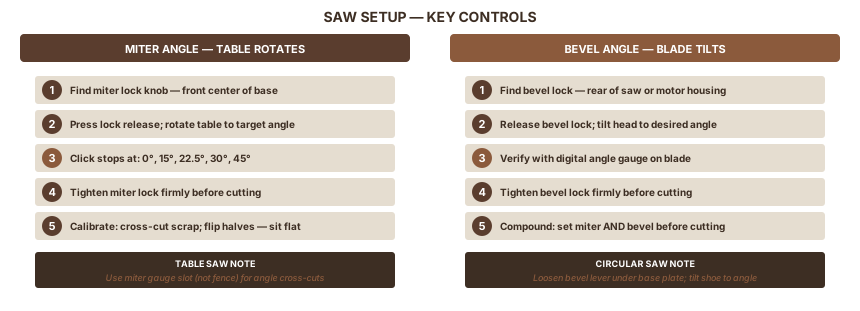
Miter saw — miter angle
- Locate the miter lock knob (front center of the base plate on most saws).
- Press the lock release and rotate the table to the target angle.
- Standard detents (click stops) are at 0°, 15°, 22.5°, 30°, and 45°. Reliable for common angles.
- For non-standard angles, hold the detent override button and set the scale precisely.
- Tighten the miter lock firmly.
Calibration check: Set to 0° and cross-cut a scrap. Hold both halves cut-face to cut-face. They should sit perfectly flat together. If the faces form a wedge, the 0° stop has drifted. Adjust per your saw's manual.
Miter saw — bevel angle
- Locate the bevel lock (rear of the saw or motor housing; varies by brand).
- Release the bevel lock and tilt the head to the desired angle.
- Re-tighten the bevel lock firmly.
For a compound cut, set both the miter angle and the bevel angle before cutting.
Table saw — bevel cut
The table saw handles long bevel rips where a miter saw can't reach.
- Tilt the blade using the hand wheel or lever below the table.
- Verify angle with a digital angle gauge placed directly on the blade. The painted scale on the indicator is a starting point only.
- Set the rip fence to the correct width from the blade.
- Use a push stick. The blade tilt changes the forces on the workpiece during the cut.
- A featherboard clamped upstream of the blade keeps the board against the fence.
Circular saw — bevel cut
If you don't own a miter saw, the circular saw handles bevel cuts through 45°.
- Loosen the bevel lock (lever or knob under the base plate).
- Tilt the shoe to the desired angle.
- Tighten the bevel lock firmly.
- Set the board show face down. Circular saws cut on the upstroke, so tear-out appears on the top face.
Circular saw — cross-grain angle cut
A circular saw doesn't rotate its table, so you guide it along a marked line or against a clamped straight edge.
For 45°: clamp a speed square at the mark and run the saw's base plate against it.
For other angles: mark the angle with a bevel gauge, then clamp a straight-edged board parallel to the cut line, offset by the distance from the saw blade to the base plate edge. Run the base plate against the guide board.
Part 5: Test Cuts and Verification
Cut scrap first. Always. According to LumberJocks' angle cutting guide, even when the math is right, real-world cuts can be off because saws drift and walls aren't square. Test pieces reveal the error before it reaches your real wood.
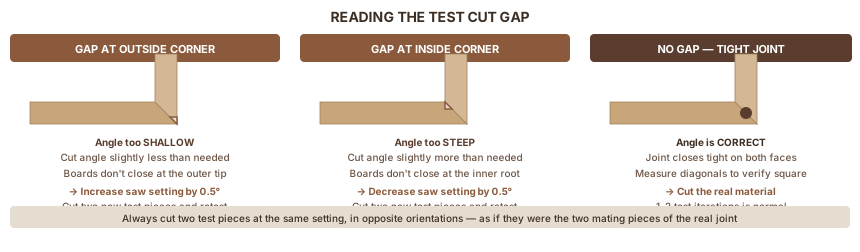
The test cut process
- Set the saw to the calculated angle.
- Cut two pieces of scrap at the same setting, in opposite orientations, as if they were the two mating pieces of the final joint.
- Hold the two scraps together at the joint.
- Read the gap:
- Gap at the outside corner: angle too shallow. Increase saw setting by 0.5°. Cut again. Retest.
- Gap at the inside corner: angle too steep. Decrease saw setting by 0.5°. Cut again. Retest.
- No gap, tight face-to-face: correct. Cut the real material.
One or two iterations is normal. Saw detents and scales are starting points, not guarantees.
Verifying a 4-corner frame
Assemble all four pieces dry. Measure both diagonals. Equal diagonals mean a square assembly. If they differ, one or more cuts is off. Find which corner shows a gap and adjust that pair.
Compound angles
When you need both a miter and bevel at once (crown molding is the most common case), the angles depend on the molding's spring angle (38°, 45°, or 52° are standard). The simplest approach: cut crown molding nested against the fence and table at its spring angle, mimicking how it will sit against the wall and ceiling. This turns a compound cut into a plain miter.
If you need to cut it flat on the saw, use the Jansson compound miter calculator. Enter the corner angle and spring angle, get both readings.
Part 6: Quick Reference — Polygon Angle Table
All figures verified against Timber Topia's polygon angle reference. Formula: Miter saw setting = 180° ÷ number of sides
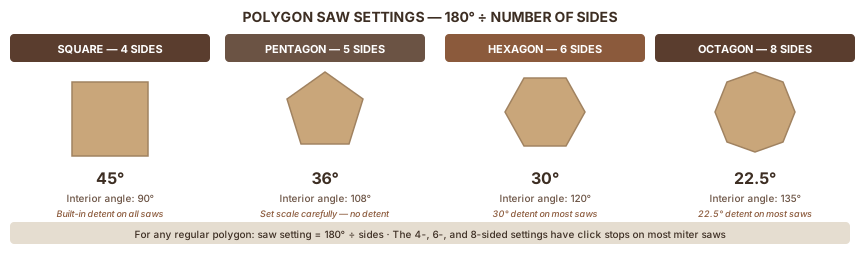
| Sides | Saw setting | Interior angle | Example project |
|---|---|---|---|
| 4 | 45° | 90° | Box, picture frame, furniture |
| 5 | 36° | 108° | Pentagon shelf, planter box |
| 6 | 30° | 120° | Hex mirror, honeybee box, hex shelf |
| 7 | 25.7° | 128.6° | Heptagon decorative frame |
| 8 | 22.5° | 135° | Octagon table, octagon clock |
| 10 | 18° | 144° | Decorative 10-sided frame |
| 12 | 15° | 150° | Circular decorative assembly |
The octagon setting (22.5°) appears as a built-in detent on most miter saws. For 4, 6, and 8 sides, you can rely on the saw's click stops. For everything else, dial in carefully and test.
Sources
This guide draws on published woodworking references, tool manufacturer documentation, and practitioner resources covering angle geometry, saw setup, and layout techniques.
- Omni Calculator — Miter Angle Calculator — corner angle formula and verification
- Timber Topia — Polygon Angle Reference — polygon formula and table
- Fine Woodworking — Bevel Gauge Basics — bevel gauge technique
- Fine Homebuilding — Cutting Miter Angles Without Measuring Tools — scrap wood bisect method
- Woodcraft — Cutting Angles in Wood — angle cutting overview and polygon setup
- Woodworkers Journal — Cutting Octagonal Pieces — polygon examples and setup
- Happily Ever After — Finding Angles Without Tools — no-tools corner method
- Wood Shop Diaries — Cutting Angles on a Miter Saw — miter saw setup
- Family Handyman — Making Circular Saw Cuts — circular saw angle techniques
- This Old House — Circular Saw Angle Cut — circular saw bevel setup
- LumberJocks — Angle Cutting Tips — test cut workflow and practitioner tips
- WoodWeb — Finding Compound Angles for Crown Moulding — compound angle reference
- Jansson — Compound Miter Calculator — compound angle calculator
- Rockler — Angle Scales and Terminology — angle terminology reference
- Out of the Woodwork — Speed Square and Bevel Gauge — speed square angle-finding technique
Tools Used
Also Referenced
Tagged