
How to Use This Guide
A jointer-planer combo does two separate jobs: flattening a reference face (jointing) and making the opposite face parallel at a target thickness (planing). Before you spend $700–$6,000 on one, you need to know what each function does — and whether a combo is the right call for your shop.
- Understanding the tools: Start at Part 1. Read Parts 1–3 in sequence.
- Deciding whether to buy a combo: Jump to Parts 4 and 5.
- Choosing a specific model: Go straight to Part 6.
- Already own one: Part 7 covers the safety rules that matter most.
Jointer-Planer at a Glance
A jointer flattens one face and one edge. A planer makes the opposite face parallel at target thickness. You need both operations for dimensioned, furniture-grade lumber. A jointer-planer combo does both in one machine footprint.
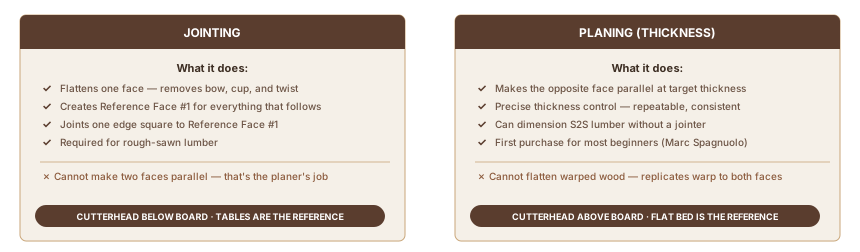
| What jointing does | Flattens one face; creates a flat reference surface |
| What planing does | Makes the opposite face parallel at target thickness |
| Can you skip the jointer? | Yes — with S2S lumber or an MDF sled workaround |
| Can you skip the planer? | Harder — hand tools can substitute, but slowly |
| Best entry combo (120V) | JET JJP-10BTOS (~$968, 10", runs on household current) |
| Buy a combo when | Space is limited + you're working with rough-sawn lumber |
In this guide:
- What a jointer actually does — the reference face concept
- Why a planer alone won't flatten warped wood
- Should you buy a combo, or separate machines?
- Models by price tier — entry to premium
Part 1: What a Jointer Does
A jointer has two flat cast-iron tables — infeed and outfeed — with a spinning cutterhead between them. The outfeed table is set precisely level with the highest point of the cutterhead arc. As a board crosses the cutterhead, the freshly cut surface lands on the outfeed table. The outfeed table becomes the reference. Not the board's original surface. Bow, cup, and twist disappear pass by pass.
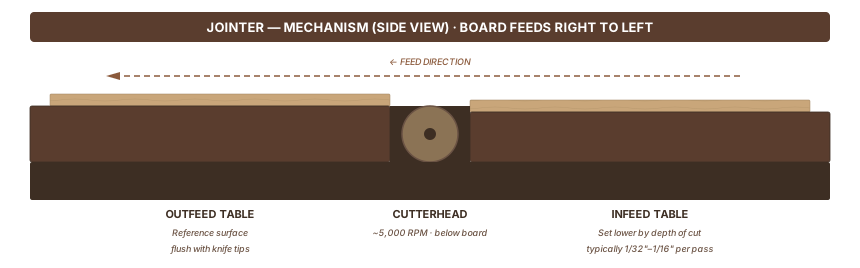
The infeed table sits lower than the outfeed by the depth of cut, typically 1/32" to 1/16". You set the board on the infeed table, push it across the cutterhead, and the new flat surface contacts the outfeed table. Enough passes and you have a flat reference face — the foundation for everything that follows.
That flat face is Reference Face #1. Once you have it, stand the board on edge with Reference Face #1 against the jointer fence (set at 90°). The jointer cuts one edge perpendicular to that face. You now have two square reference surfaces: one face and one edge. The rest of the milling sequence builds from these two.
One thing a jointer cannot do: Make two faces parallel. The jointer references its own tables, not the opposing face. Joint both faces and you get two flat faces that are not parallel to each other. Thickness parallelism is the planer's job.
Part 2: What a Planer Does — and Cannot Do
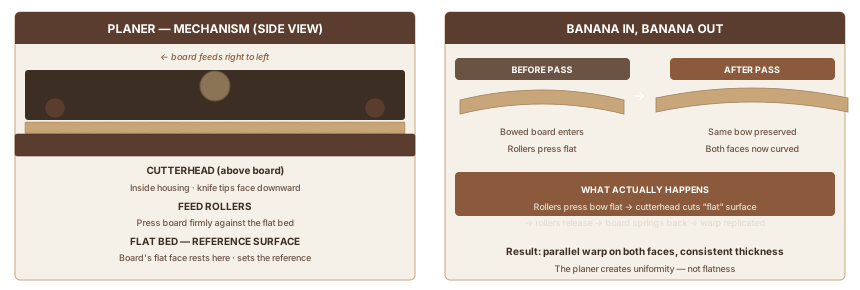
A thickness planer uses rubber feed rollers to pull the board through at a set height. The cutterhead above removes material from the top face. The flat machine bed below is the reference. Whatever face sits on the bed, the planer cuts the top face parallel to it. That's what a planer does: it makes one face parallel to another.
Why a Planer Won't Flatten Warped Wood
Run a cupped board through a planer and you'll see the problem firsthand.
The feed rollers press the board against the flat bed with significant force as it passes through. A cupped board — curved across its width — gets pressed flat temporarily. The cutterhead cuts what appears to be a flat surface. The board exits, the roller pressure releases, and the board springs back to its original cupped shape.
Both faces are now parallel copies of the original warp, cut to a consistent thickness. The planer made them parallel, but didn't make them flat.
Woodworkers call this "banana in, banana out." A bowed board follows the bed profile. A twisted board has the twist replicated to both faces. Fine Woodworking's guide to flattening cupped boards explains the physics in detail.
The jointer exists because of this limitation. Its tables provide the flat reference a planer can't create on its own.
The MDF Sled Workaround
No jointer? You can still handle occasional rough stock. Secure the warped board to a flat MDF sled. Shim any rocking spots with small wedges hot-glued in place. Run the sled through the planer — the sled's flat bottom acts as the reference face. Flip the board and plane the second face to final thickness.
It works. It's slower than a jointer for anything beyond occasional rough stock, but it's a real solution when you're buying one machine at a time.
Part 3: The S4S Workflow — Why Sequence Matters
S4S stands for "surfaced 4 sides" — four flat, square surfaces that give you dimensioned lumber ready for joinery.
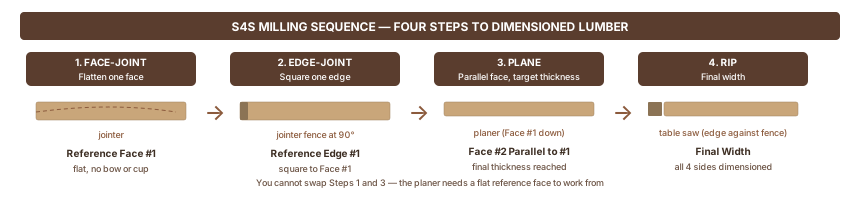
Step 1 — Face-joint (jointer): Place the concave side down on the infeed table. Take 1/32" passes until one face is flat with no bow, cup, or twist. This is Reference Face #1.
Step 2 — Edge-joint (jointer): Stand the board on edge with Reference Face #1 against the fence. Joint until one edge is straight and 90° to Reference Face #1.
Step 3 — Plane to thickness (planer): Place Reference Face #1 down on the planer bed. Take light passes until you reach final thickness. Face #2 is now flat and parallel to Face #1.
Step 4 — Rip to width (table saw): Place the jointed edge against the fence. Rip to final width.
As The Wood Whisperer explains, Step 3 requires a flat reference face on the planer bed. Without Step 1, the planer has no accurate reference — it replicates whatever warp is present to both faces at a consistent thickness.
You can't swap Steps 1 and 3. You can't create parallel faces on a jointer alone. The sequence is the method.
Part 4: Combo Machines — Genuine Trade-offs
A jointer-planer combo uses one machine body and one cutterhead for both operations. To switch from jointing to planing, you reposition the tables and re-route the infeed path. On budget machines, this takes 5–10 minutes. On premium machines like the Hammer A3-31 and SCM Minimax FS series, the switch takes 30–60 seconds.
What Combos Do Well
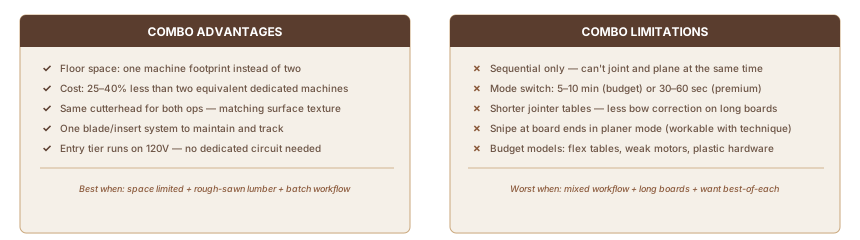
Floor space. This is the real argument for a combo. In a single-car garage, a dedicated 8" jointer and a 13" planer together need roughly 6–8 feet of wall space and a clear path around each. One combo uses the footprint of one tool.
Cost savings. According to Elite Metal Tools, a combo costs 25–40% less than buying two separate machines of equivalent quality. The Grizzly G0958 at $695 gives you both jointing and planing capacity. Buying equivalent dedicated machines separately costs more.
Surface consistency. The same cutterhead handles both operations. Jointed and planed surfaces accept stain and finish identically. Separate machines with different cutterheads can produce subtly different surface textures that show up under finish.
One blade system. One set of inserts or knives to track, maintain, and replace.
Where Combos Fall Short
Sequential operation only. Combos work in batches — joint all your parts, switch modes, plane all your parts. You can't joint and plane at the same time. In any workflow where boards move back and forth between operations, mode-switching time accumulates.
Shorter jointer tables. Popular Woodworking's straight talk on combo machines notes that a 10" benchtop combo typically has a 36" jointer table, while a dedicated 8" jointer in the same price range often has a 60" table or longer. Longer tables detect and correct bow in long stock more accurately — the board bridges a greater span before the outfeed table engages.
Snipe at board ends. Most combos show snipe in planer mode — a shallow gouge where feed rollers engage or release unevenly. Fix it: apply slight upward pressure at board ends during the pass, or run sacrificial scrap boards immediately before and after the workpiece.
Budget combos cut corners you'll feel. Aluminum tables flex under pressure. Plastic handles strip with use. Motors bog down in wide or dense hardwoods. At the entry tier, these are the trade-offs you're managing.
Part 5: Should You Buy a Combo?
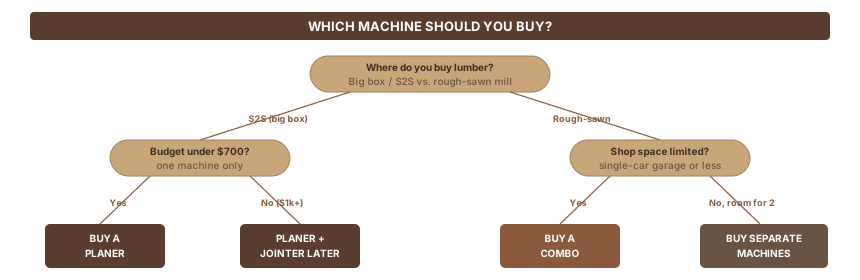
Three things determine the answer: where you buy your lumber, how much space you have, and what you can spend.
Start With a Planer (Most Beginners)
Marc Spagnuolo of The Wood Whisperer puts it directly: "you should purchase the planer first. You'll be able to accomplish more with it on its own than you can with a jointer."
The reason is lumber source. Most beginners buy from big box stores or hardwood dealers that sell S2S (surfaced 2 sides) lumber — already face-planed. You need the planer to reach final thickness. Without a planer, you're stuck with whatever thickness the mill chose. Without a jointer, you can substitute with a table saw fence, a router table sled, or hand planes. Imperfect, but workable.
Budget under $700 and can only buy one machine? Buy a good dedicated planer.
When a Combo Makes Sense
A combo earns its cost when:
- You're buying rough-sawn lumber from a local sawmill or hardwood dealer
- Your shop is one car's worth of floor space
- Your budget is $700–$1,500 and you want both jointing and planing capacity now
- You work in batches — all jointing first, then all planing
The JET JJP-10BTOS (~$968) hits the sweet spot for most home shops at this budget. Ten-inch jointing width handles everything up to wide panels, it runs on 120V household current without a dedicated circuit, and the stand is included. For tighter budgets, the Grizzly G0958 ($695) offers an excellent helical cutterhead at 8" capacity.
When to Buy Separate Machines
At a $1,000–$2,000 budget, separate machines give you more capacity per dollar. A DeWalt DW735 13" planer runs around $600. A solid 6" jointer (Rikon, JET) runs $350–$450. That combination delivers more planing width, longer jointer tables, and fully independent operation compared to any combo in this price range.
Buy the combo if the trade-offs (shorter tables, mode-switching, width limits) match how you work. Buy separate machines if you want the best of each tool and budget allows.
Part 6: Budget Guide: Models by Price Tier
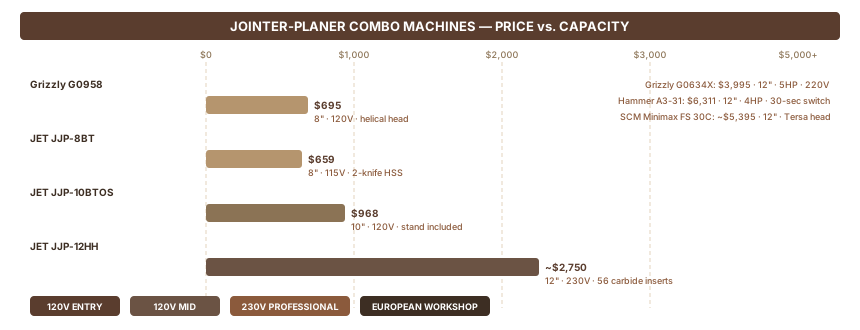
| Machine | Jointing Width | Table Length | Power | Price | Cutterhead |
|---|---|---|---|---|---|
| JET JJP-8BT | 8" | 29" | 13A, 115V | ~$659 | 2-knife straight HSS |
| Grizzly G0958 | 8" | 29-1/4" | 1.5 HP, 120V | $695 | Helical, 18 carbide inserts |
| JET JJP-10BTOS | 10" | 36" | 13A, 120V | ~$968 | 2-knife HSS, stand included |
| JET JJP-12HH | 12" | ~55" | 3 HP, 230V | ~$2,500–3,000 | Helical, 56 carbide inserts |
| Grizzly G0634X | 12" | 59-1/2" | 5 HP, 220V | $3,995 | V-helical, 48 inserts |
| Hammer A3-31 | 12" | 55-1/8" | 4 HP, 230V | $6,311 | Silent-Power spiral |
| SCM Minimax FS 30C | 12" | — | 4.8 HP, 230V | ~$5,395 | Tersa quick-change |
What Each Tier Buys You
Under $1,000 (120V): The G0958 and JJP-10BTOS both run on standard household outlets — no 220V circuit upgrade needed. That matters in a rented house or unmodified garage. At 8"–10" capacity, they handle most furniture parts. The G0958's helical head is a real advantage at this price; carbide inserts produce a cleaner surface and rotate when dull instead of requiring a sharpening jig.
$1,500–$4,000 (220V, helical heads): The JJP-12HH and G0634X step up to 12" capacity with 48–56 carbide inserts. Surface quality improves substantially — less tearout on figured or interlocked wood, quieter operation. Both require 230V. If you're setting up a permanent shop with a real circuit, this tier earns its price.
$5,000+ (European precision): The Hammer A3-31 and SCM Minimax FS series are workshop infrastructure, not a purchase you revisit. The Hammer A3-31 switches modes in 30–60 seconds. Its Silent-Power cutterhead runs near-silently; the carbide inserts last far longer than HSS knives. These machines don't wear out — they outlast the shop.
Part 7: Operating a Combo Machine Safely
The jointer is one of the most dangerous machines in the shop. The cutterhead spins with exposed blades and no margin for error. No shortcuts.
Grain Direction — Read It Before Every Board
"With the grain" means the cutterhead knives cut downhill along the grain fibers. Against the grain tears fibers up, produces tearout, and can kick back.
How to read it: look at the board edge. Find which way the grain lines slope. Feed the board so the knives travel downhill along those lines — same direction you'd pet a cat, with the fur. Katz-Moses Tools' grain direction guide covers how to read grain on different species quickly.
Tearout on a test pass? Flip the board end-for-end and try again. Figured wood, interlocked grain, and riftsawn boards don't always have a clean right direction. Go lighter (1/64" passes) and slower.
Depth of Cut and Push Blocks
Max depth for hardwoods: 1/16" (2mm) per pass. Wide or dense stock: drop to 1/32". Softwoods and narrow edge jointing: up to 1/8" is workable.
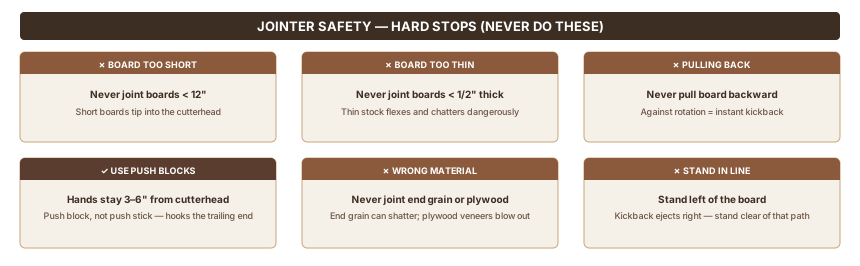
BC Campus Woodworking Machinery specifies using a push block — not a push stick — that hooks over the trailing end of the board. Your hands stay 3–6" clear of the cutterhead at all times. On face-jointing passes, run the push blocks through the entire cut, past the cutterhead, until the board is completely clear.
Hard Stops
Per OSU's jointer training guidelines:
- Never joint boards shorter than 12" — short boards can tip into the cutterhead
- Never joint boards thinner than 1/2"
- Never pull a board backward out of the jointer against the cutterhead rotation
- Stand to the left of the board — kickback ejects material toward the infeed side, to your right
- Never joint end grain or plywood
- Dull knives grab instead of cut, dramatically increasing kickback risk
Sources
Research for this guide drew on manufacturer product specifications, woodworking education resources, and practitioner guides on jointer-planer fundamentals and stock preparation.
- Katz-Moses Tools — How to Use a Jointer — jointer mechanism and technique
- BC Campus Woodworking Machinery — jointer safety and mechanics
- Fine Woodworking — Flattening Cupped Boards — why planers can't flatten warped wood
- The Wood Whisperer — Planer or Jointer First — beginner buying sequence
- Saratoga Joinery — S4S Milling — the four-step milling workflow
- Grizzly G0958 product page — entry combo specs and pricing
- Woodcraft — JET JJP-10BTOS — mid-entry combo specs and pricing
- Grizzly G0634X product page — mid-range combo specs and pricing
- Felder Group — Hammer A3-31 — premium combo specs and pricing
- Popular Woodworking — Straight Talk on Combo Machines — table length trade-offs and limitations
- Elite Metal Tools — Combo Pros and Cons — cost comparison vs. separate machines
- Katz-Moses Tools — Grain Direction — reading grain for safe jointing
- OSU Jointer Training — safety requirements
Also Referenced
Tagged
How We Research
We don't take affiliate revenue or accept review units. Picks come from multi-source research — manufacturer specs, OSHA / EPA / ASTM regs, and long-form practitioner threads — plus Ahmed's hands-on use where relevant. When we recommend something, we explain why.
Up Next
What Is an Electric Hand Planer?
POWER TOOLS · Beginner