
Router at a Glance
A router is a high-speed motor that spins shaped cutters at 8,000–30,000 RPM to profile edges, follow templates, and cut joinery pockets. Three operations — edge profiles, template routing, and plunge mortises — are things no other common shop tool can do. Every routing problem traces to one of five variables: size, bits, speed, direction, and depth. Get those right and the router becomes the most versatile tool in your shop.
| Speed range | 8,000–30,000 RPM (variable) | | Collet sizes | 1/4" (standard on trim routers) and 1/2" (full-size) | | HP tiers | 0.5–1.25 HP (trim) · 1.75–3.25 HP (full-size) | | Max depth per pass | 1/4"–3/8" — multiple passes to final depth | | Safety gear | Eye + hearing protection (90–100 dB at the bit) | | First operation | Round-over on a scrap board — 5 minutes, immediate result |
In this guide:
- What only a router does — the three unique operations
- Anatomy and setup — base, motor, and collet
- The five variables that govern every cut
- Templates, joinery, and jigs
- What goes wrong and how to diagnose it
Part 1: What Only a Router Does
Three operations separate a router from everything else in a shop.
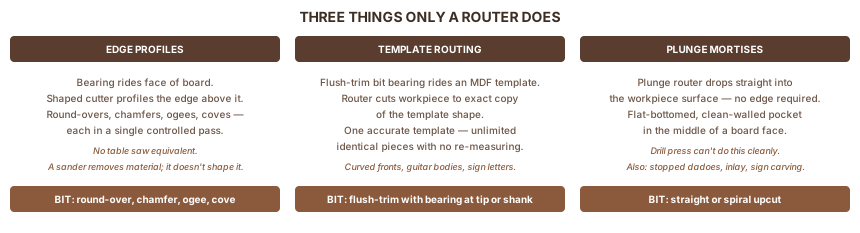
Edge profiles. A router bit with a bearing rides the face of a board while a shaped cutter profiles the edge above it. Round-overs, chamfers, ogees, coves — each requires only one pass. A table saw can't do any of these. A sander removes material without shaping it. Only a router produces a consistent profile along an edge in a single controlled pass.
Template routing. Clamp an MDF template to a workpiece, run a flush-trim bit with its bearing against the template, and the router cuts the workpiece to an exact copy of the template shape. Make one accurate template and you can duplicate that shape — a curved drawer front, a guitar body, a sign letter — as many times as you need. No measuring on subsequent pieces.
Plunge mortises. A plunge router's motor drops straight down into the workpiece surface. No starting edge required. That's how you cut a rectangular mortise pocket in the middle of a board face, or a stopped dado that doesn't run to the board's end. A drill press removes material in the same area, but only a router leaves the flat-bottomed, clean-walled pocket that joinery requires.
If you're still deciding whether to buy one, the beginner explainer walks through all six operations and which type to buy first.
Part 2: Anatomy and Setup
The base: fixed vs. plunge
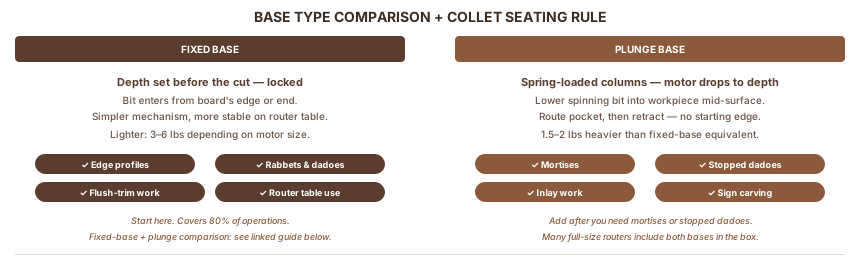
Fixed-base: You set depth before the cut, lock it, and the bit stays at that depth throughout. The router enters the cut from the board's edge or end. Use a fixed-base for: edge profiles, rabbets, through dadoes, and flush trimming. Simpler mechanism, more stable on a router table.
Plunge base: Spring-loaded columns let the motor assembly drop straight down into the workpiece. You lower the spinning bit to depth, route the pocket, then retract. Required for: mortises, stopped dadoes, inlay work, and sign carving. Heavier than a fixed-base by about 1.5–2 lbs.
Most woodworkers buy a fixed-base first and add a plunge base later. A fixed-base vs. plunge comparison covers which specific operations require each type.
The motor and HP
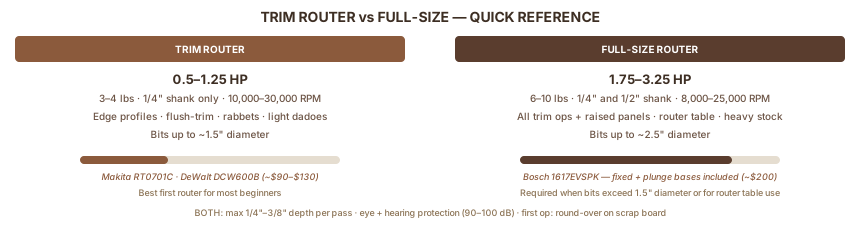
Trim routers (0.5–1.25 HP, around 3–4 lbs) handle edge profiles, flush trimming, light dadoes, and small mortises. The Makita RT0701C at ~$90 and the DeWalt DCW600B are the two most recommended. They take 1/4" shank bits only.
Full-size routers (1.75–3.25 HP, 6–10 lbs) handle everything trim routers do plus: raised panels, large cove bits, heavy stock removal, and router table work. The Bosch 1617EVSPK at ~$200 includes both a fixed base and a plunge base and accepts 1/4" and 1/2" shank bits.
For first-time buyers, the trim router vs full-size comparison maps operations to router capability.
The collet
The collet is a precision tapered sleeve that grips the bit's shank. Two sizes:
1/4" shank covers every beginner operation and most intermediate work. Smaller diameter means slightly more flex on large-diameter bits, but for anything under 1.5" diameter it's more than adequate.
1/2" shank provides more stability for bits over 1" diameter — raised panel bits, large cove bits, drawer lock bits. Less vibration, cleaner cuts on demanding profiles. Full-size routers typically accept both sizes with an adapter or separate collet.
Seating a bit: Insert the shank until it bottoms out in the collet, then back it out about 1/16". This clearance prevents the collet from seizing on the shank — a seized collet often requires vice grips to remove. Tighten firmly with both wrenches if your router has a spindle lock; use the collet wrench and the spindle lock button if it doesn't.
Part 3: The Five Things That Matter Most
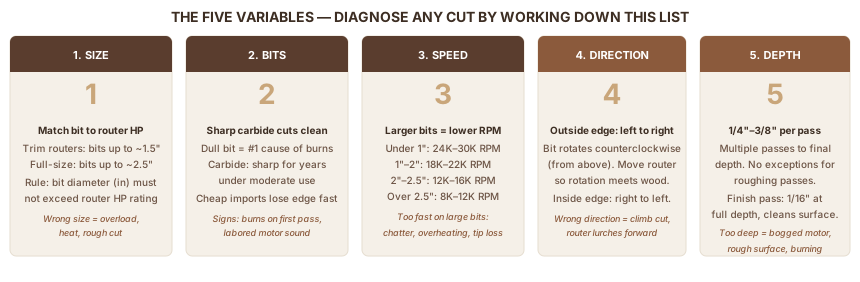
Every router problem traces to one of these five variables. Learn the framework and you can diagnose any cut by working down the list.
1. Size — match the bit to the router
Trim routers run bits up to about 1.5" in diameter cleanly. Push a 2.5" raised panel bit into a trim router and you overload the motor, generate excess heat, and get a rough cut. The rule: if the bit diameter in inches exceeds the router's HP rating, you're at or past the limit.
For full-size routers, the constraint works the other way: running a 1/4" straight bit at full speed in a 3 HP router is fine — the motor is just lightly loaded. Mismatch only hurts when you're under-powered for the bit.
2. Bits — sharpness and type
A dull bit is the most common cause of burn marks. Carbide bits stay sharp for years under moderate use, but cheap imports lose their edge quickly. Signs of a dull bit: burn marks appear even on the first pass, the motor sounds labored, you need to push harder than usual.
Key bit types to know:
| Bit Type | What It Cuts | Notes |
|---|---|---|
| Straight / spiral | Dadoes, grooves, mortises | Upcut spirals evacuate chips from deep pockets |
| Round-over | Curved edge profile | Bearing rides board face; choose radius first |
| Flush-trim | Copies a template exactly | Bearing at tip (bottom) or shank (top) |
| Rabbeting | L-shaped notch on edge | Interchangeable bearings change rabbet width |
| Chamfer | 45° bevel | Fast, clean look on contemporary furniture |
| Ogee / Roman ogee | S-shaped classical profile | Cabinet doors, traditional furniture |
| Core box / cove | Concave curve | Slow feed rate required |
| Dovetail | Angled trapezoidal slot | Sliding dovetails, T-track slots |
3. Speed — RPM by bit diameter
Larger diameter bits have higher centripetal force at the tip. Run them too fast and the bit chatters, overheats, or in worst cases throws a carbide tip. Variable-speed routers have a 1–6 dial; match it to the bit:
| Bit Diameter | RPM Range |
|---|---|
| Under 1" | 24,000–30,000 RPM |
| 1"–2" | 18,000–22,000 RPM |
| 2"–2.5" | 12,000–16,000 RPM |
| Over 2.5" | 8,000–12,000 RPM |
If your router has no variable speed dial, it runs at roughly 24,000–27,000 RPM — fine for bits under 1", marginal for larger profiles.
4. Direction — conventional feed vs. climb cutting
The bit rotates counterclockwise when you look down from above. On outside edges (the long face of a board), move the router left-to-right when facing the cut. This is conventional feed: the bit's rotation pulls against the workpiece, keeping the router tracking smoothly.
Moving right-to-left on an outside edge is a climb cut. The bit grabs and accelerates into the wood. The router lurches forward. Climb cutting has one legitimate beginner use (a very light skim pass to prevent tear-out on certain grain), but treat it as off-limits until you've run at least 50 feet of conventional cuts and understand what you're doing.
On inside edges — routing the inside of a frame, circle, or recess — direction reverses. Move right-to-left on inside edges for conventional feed.
Router table direction: The workpiece moves left-to-right past the bit when using a fence. The same principle applies — you're feeding against bit rotation.
5. Depth — 1/4" to 3/8" per pass
No matter how sharp the bit or how powerful the router: limit each pass to 1/4"–3/8". For a 3/4" deep dado, make two or three passes at 1/4"–3/8" each, lowering the bit between passes.
One exception: a final finish pass of 1/16" or less at full depth cleans up surface fuzz and any tear-out from the roughing passes. On hardwoods with tricky grain, this light finish pass makes a noticeable difference in surface quality.
RELATED: Router Mistakes Beginners Make A four-check pre-cut habit prevents the most common errors — wrong direction, unsecured workpiece, loose bit — before the bit touches wood.
Part 4: Speed, Feed, and Direction in Depth
Feed rate — how fast you move the router across the wood — pairs with RPM to determine cut quality.
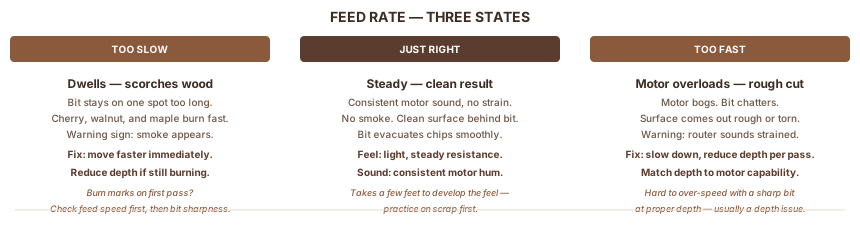
Too slow: the bit dwells on one spot and scorches the surface. Cherry, walnut, and maple burn especially fast. Smoke is the warning. If you see smoke, move faster or reduce depth.
Too fast: the motor overloads, the bit chatters, and the surface comes out rough. The router sounds strained. Back off the depth and slow down.
Right: steady movement, consistent motor sound, no smoke, clean surface behind the bit. That's the target.
End grain requires extra attention. Wood fibers at the end of a board tear out far more easily than long-grain fibers. Two fixes: rout the end-grain edges first, then the long-grain edges (which clean up any tear-out from the ends); and back up the trailing corner with a scrap block clamped flush so the bit has wood to cut into instead of open air.
Part 5: Edge Profiles and Decorative Work
Edge profiles are most beginners' first routing operation — and the one that makes the biggest visible difference on finished furniture.
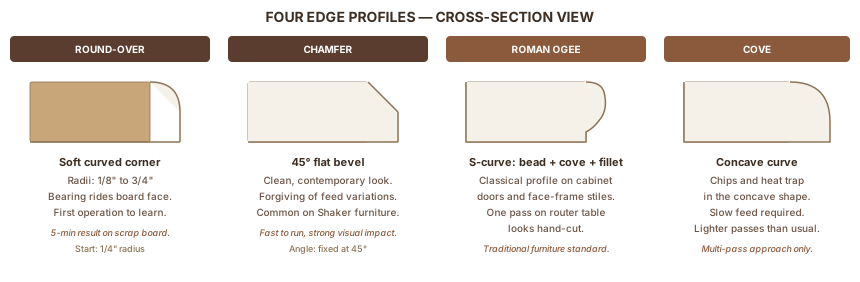
Round-over converts a sharp 90° corner into a smooth curve. Radii from 1/8" (barely perceptible softening) to 3/4" (bold, sculptural edge). The bearing rides the face of the board; the radius above it cuts the profile. Start with a 1/4" round-over on a cutting board edge — you'll have your first clean routing operation in five minutes.
Chamfer cuts a 45° bevel. Clean, contemporary look. Fast to run and forgiving of minor feed-rate variations. Common on Shaker furniture, modern cabinets, and shop fixtures.
Roman ogee produces an S-shaped classical profile: a small bead, a cove, then a flat fillet. It's what you see on most traditional cabinet doors. One pass on a router table makes a face-frame stile look hand-cut.
Cove is a concave curve along an edge. Slow feed rate matters here — the concave geometry traps chips and heat. Take lighter passes than usual.
Multi-pass for large profiles: Any profile taller than about 1/2" should come down in two passes: a 3/8" roughing pass, then a 1/16" finish pass at full depth. The finish pass removes the fuzz and compression marks left by the rougher cut and leaves a surface you can sand straight to 180 grit.
Part 6: Templates, Joinery, and Jigs
Template routing
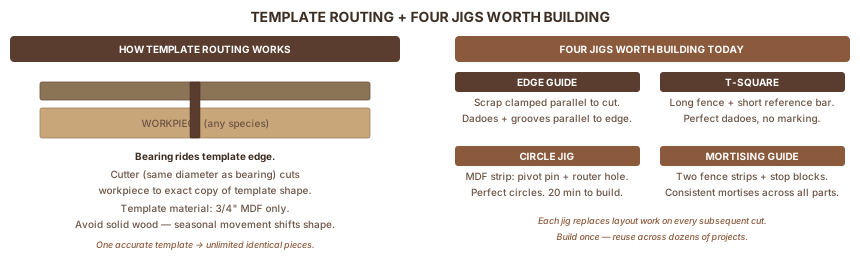
Flush-trim bit: A straight bit with a bearing at the tip or shank that's the same diameter as the cutter. Clamp a 3/4" MDF template to the workpiece; the bearing rides the template while the bit cuts the wood to match. 3/4" MDF is the right template material: it cuts cleanly, holds shape, and gives the bearing a smooth surface to roll against. Avoid solid wood templates — seasonal movement shifts the shape.
Guide bushing: A cylindrical collar inserted into the router's base plate. The bushing's outside rides the template; the bit (smaller than the bushing) cuts offset from the template edge. The offset is (bushing OD − bit diameter) / 2. Used with plunge routers for hinge mortises (with a dedicated hinge template), inlay work (with an inlay kit), and sign carving.
Joinery
Dadoes and rabbets are the most useful joinery operations a beginner runs. A straight bit guided by a fence cuts flat-bottomed dadoes across the grain (shelf support) or grooves with the grain (panel slots). A rabbeting bit with an interchangeable bearing set cuts L-shaped rabbets to house plywood backs in cabinet carcases.
Mortises require a plunge router. Set two parallel fence strips clamped to the workpiece spaced for the mortise width. Lower the bit in 1/4" increments, routing end-to-end between stop blocks. A spiral upcut bit clears chips efficiently from deep mortises. For production work, build a dedicated mortising guide once — it pays back in every project that needs mortise-and-tenon joints.
Sliding dovetails use a dovetail bit to cut both the slot and the mating tail. The strongest mechanical joint a router makes. Used for breadboard ends, web frames, and fixed shelf connections.
Four jigs worth building
Edge guide (fence): A straight scrap clamped parallel to the cut line at the offset distance. Guides the router for dadoes, grooves, and rabbets parallel to an edge. Build it for a specific cut and re-clamp; or buy a commercial edge guide with a micro-adjust knob.
T-square: Two pieces of MDF — a long fence and a short perpendicular reference bar that registers against the board edge. Clamp the fence across the workpiece and run the router along it. Perfect dadoes perpendicular to the edge without marking a line each time.
Circle-cutting jig: A strip of MDF with a pivot pin at one end and a hole for the router base at the other. Set radius = pivot-to-bit distance. Drives perfect circles for tabletops, clock faces, round trays. Twenty minutes to build, decades of use.
Mortising guide: Two fence strips clamped to the workpiece, spaced for the mortise width, with stop blocks at each end. Eliminates layout and guarantees consistent mortise length across multiple parts.
Part 7: What Goes Wrong
Map each symptom back to the five variables and the cause becomes clear.
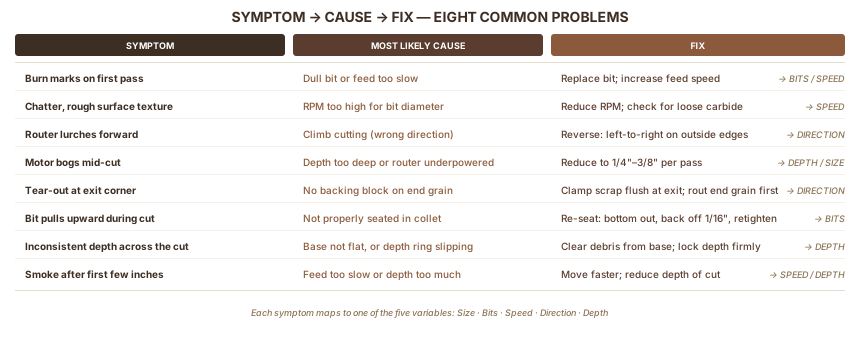
| Symptom | Most Likely Cause | Fix |
|---|---|---|
| Burn marks on first pass | Dull bit or too-slow feed | Replace bit; increase feed speed |
| Chatter, rough surface texture | RPM too high for bit diameter | Reduce RPM; check bit for chips or loose carbide |
| Router lurches forward | Climb cutting (wrong direction) | Reverse feed direction — move left-to-right on outside edges |
| Motor bogs mid-cut | Depth too deep or underpowered router | Reduce depth per pass to 1/4"–3/8"; match router HP to bit size |
| Tear-out at exit corner | No backing block on end grain | Clamp scrap flush behind the exit; rout end grain first |
| Bit pulls upward during cut | Not properly seated in collet | Re-seat: bottom out, back off 1/16", retighten firmly |
| Inconsistent depth across the cut | Base not sitting flat, or depth ring slipping | Check base for debris; lock depth adjustment firmly |
| Smoke after first few inches | Slow feed rate or too much depth | Move faster; reduce depth of cut |
For more detailed diagnosis on specific problems, the router troubleshooting guide covers each failure mode with step-by-step fixes.
FAQ
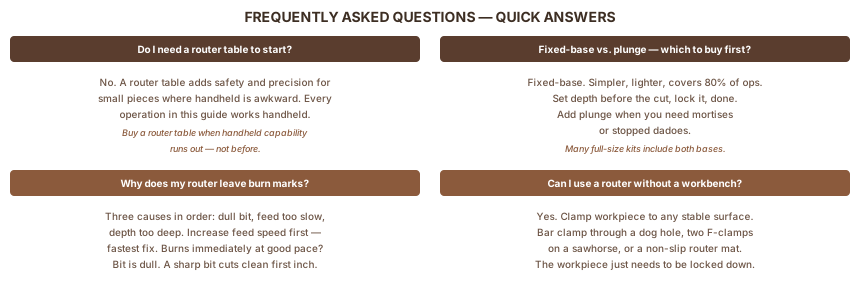
Do I need a router table to get started?
No. A router table adds safety and precision for small or narrow pieces (where handheld routing is awkward) and makes long profiling runs more consistent. But every operation in this guide works handheld. Buy a router table when your work outgrows handheld capability — not before.
What's the difference between a fixed-base and plunge router for a beginner?
A fixed-base router sets depth before the cut and stays at it. A plunge router drops the spinning bit into the workpiece mid-surface. Start with a fixed-base — simpler, lighter, covers 80% of operations. Add a plunge base when you need mortises or stopped dadoes. See the full fixed-base vs. plunge comparison.
Why does my router leave burn marks?
Three causes, in order of likelihood: dull bit, feed rate too slow, or depth too deep. Try increasing your feed speed first — it's the fastest fix. If burns appear immediately even at a good pace, the bit is dull or the depth per pass is too much. A sharp bit should cut clean on the first inch.
Can I use a router without a workbench?
Yes — clamp the workpiece to any stable surface at a comfortable height. What matters is that the workpiece can't move during the cut. A single bar clamp through a workbench dog hole, two F-clamps on a thick sawhorse, or a non-slip router mat all work. The router doesn't care what's underneath; the workpiece just needs to be locked down.
Sources
This guide draws on manufacturer product specifications and established woodworking publications.
- Makita RT0701C product specifications — HP (1.25 peak), RPM range (10,000–30,000), weight (3.3 lbs), 1/4" collet
- DeWalt DWP611 product specifications — 1.25 HP continuous, RPM range (16,000–27,000), 1/4" and 1/2" collet
- Bosch 1617EVSPK product specifications — 2.25 HP, RPM range (8,000–25,000), fixed and plunge bases
- Fine Woodworking — Router Fundamentals — feed direction, depth-of-cut technique, end-grain handling
- Popular Woodworking — Router Joinery — dadoes, rabbets, mortises, template routing
- Rockler Router Bit Guide — bit type descriptions, shank sizes, speed recommendations
Tools Used
Also Referenced
How We Research
We don't take affiliate revenue or accept review units. Picks come from multi-source research — manufacturer specs, OSHA / EPA / ASTM regs, and long-form practitioner threads — plus Ahmed's hands-on use where relevant. When we recommend something, we explain why.
Up Next
What Does a Router Do in Woodworking?
POWER TOOLS · Beginner