
QUICK ANSWER: Three router guides cover almost everything: the edge guide that ships with most routers (an aluminum bar that follows the workpiece edge, useful for cuts within 4–6" of the edge); the straight-edge clamp guide (a long straightedge clamped across wider panels for dadoes and grooves anywhere on the surface); and the guide bushing (a metal collar bolted to the router base, used with a template for shape copying or inlay work). Edge guide for edge-relative cuts, clamp guide for straight cuts on wide panels, bushing for templates. The right guide is determined by what you're cutting, not the router brand.
How to Use This Guide
Skill level: Beginner. You need to know how to install a bit and set depth on your router. New to routers entirely? Start with the wood routers guide first.
A router without a guide is a precision tool used imprecisely. The router cuts a perfect circle. The challenge is keeping that circle on the intended line across several feet of wood. Router guides solve that.
This guide covers the three types of guides you'll actually use: the edge guide that ships with most routers (typically reaching 4 to 6 inches from the board's edge), the straight-edge clamp guide for wider panels, and the guide bushing for template work.
If you already have a router with the accessory bar: Jump to Part 2: Setting Up and Using the Edge Guide.
If you're cutting dadoes across a wide panel: Jump to Part 3: Straight-Edge Clamp Guides.
If you have a dovetail jig or want to route mortises: Jump to Part 4: Guide Bushings and Template Routing.
If something just went wrong: Jump to Part 5: Troubleshooting.
Router Guides at a Glance
A router guide constrains the router to a straight (or curved) path, turning a freehand cut into a precise, repeatable operation. Most routers come with an edge guide. That one accessory handles 80% of what beginners need.
| Most common type | Built-in edge guide (fence), ships with most routers |
|---|---|
| Edge guide reach | Typically 4–6" from board edge |
| Offset formula | (bushing OD − bit diameter) ÷ 2 |
| Maximum depth per pass | 1/4" (use 1/8" for cleanest cuts) |
| Feed direction | Move LEFT to RIGHT along near edge (conventional feed) |
| Tearout prevention | Clamp scrap flush at exit end before routing |
In this guide:
- The four types and when to use each
- Setting up the edge guide step by step
- Straight-edge clamp guides for wide panels
- Guide bushings and the offset formula
- Common mistakes and how to fix them
Part 1: The Four Types of Router Guides
Not all cuts use the same guide. Knowing which one fits the operation saves setup time and prevents the most common routing mistakes.
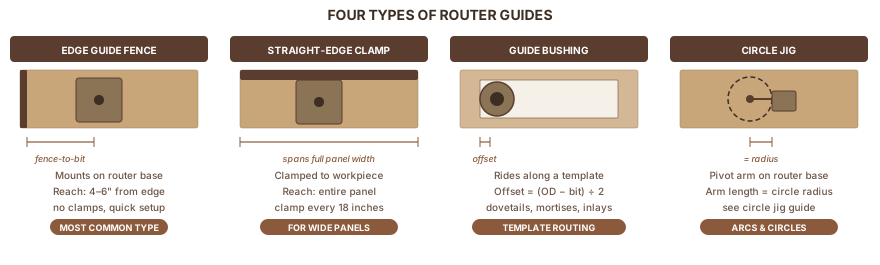
Edge Guide (Built-In Fence)
A metal bar that mounts on two steel rods threaded into the router's base. The fence face presses against the board's edge; the bit cuts at a fixed, adjustable distance from that edge. Most routers include one in the box.
Best for: grooves, dadoes, and rabbets within 4–6" of the board's edge. The reach limit is the rod length, usually 4 to 6 inches depending on the router model.
Straight-Edge Clamp Guide
A long aluminum bar clamped directly to the workpiece. The router base rides along it. No distance limitation from the edge. It works anywhere on the panel, including the middle of a 4x8 sheet of plywood.
Best for: dadoes across wide panels, sheet good crosscuts, any cut more than 6" from the board's edge.
Guide Bushing (Template Guide)
A collar that mounts in the router's baseplate and surrounds the bit. The collar rides along the edge of a template; the bit cuts through the center. Any shape the template defines, the router can cut. Build the template once and the result is the same every time.
Best for: dovetail jigs, mortises, inlay work, any cut that needs to be identical across multiple pieces.
Circle Jig (Trammel)
A pivot arm or strip of plywood attached to the router base. The bit traces an arc around a fixed center point. Distance from pivot to bit = circle radius. This guide type deserves its own full treatment. See the circle jig for a router guide for the complete setup and use instructions.
Which Guide for Which Cut
| Operation | Best guide | Why |
|---|---|---|
| Groove or dado within 4–6" of edge | Edge guide (fence) | Quick setup; one measurement |
| Groove or dado across a wide panel | Straight-edge clamp | Not limited by rod length |
| Rabbet along the edge | Edge guide or rabbeting bit | Edge guide for width control; rabbeting bit needs no setup |
| Mortise (same size, repeated) | Guide bushing + template | Same result on every piece |
| Dovetail joints | Guide bushing + dovetail jig | Jig provides the template |
| Circle or arc | Circle jig | Only repeatable way to cut a circle freehand |
| Edge profile (roundover, chamfer, cove) | No guide needed | Bearing rides the edge directly |
RELATED: Wood Routers Not sure which router to start with? The wood routers guide covers types, sizes, and what to buy first.
Part 2: Setting Up and Using the Edge Guide
The edge guide is the most ignored accessory in the router box. Most beginners clamp a piece of scrap to the board instead and get wavy cuts. The actual fence, set up correctly, produces a cleaner result and takes less time.
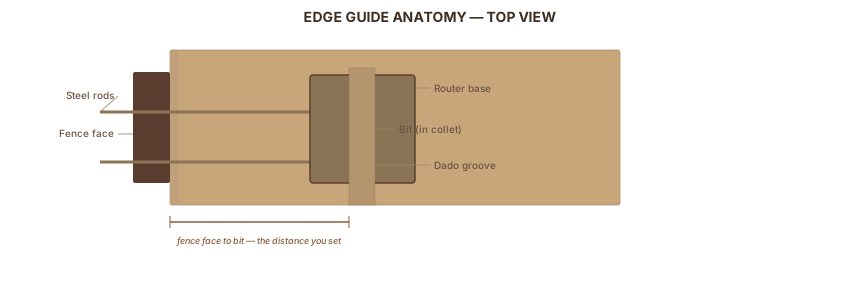
Anatomy
Two steel rods thread into holes in the router's base. A metal fence bar slides along the rods; a clamping screw locks it at the set position. Some models include a micro-adjust knob for fine-tuning without fully loosening the clamp screw. You can also attach a strip of straight scrap wood to the metal fence face. This increases contact area on rough or narrow stock.
Five-Step Setup
-
Mark your cut position. For a dado 1" from the edge: draw a line 1" from the edge.
-
Measure from the bit's outer edge to the fence face. With the router unplugged and the bit installed, hold a ruler against the fence face. Slide the fence until the gap from bit outer edge to fence face matches your target distance. Measure from the bit's OUTER edge, the edge closest to the fence, not the bit's center.
-
Tighten the clamping screws. Firm contact is not optional. A loose fence drifts mid-cut and ruins the workpiece.
-
Test on scrap. Make a 4" pass on the same species and thickness. Measure the actual cut position with a ruler or calipers. Fine-tune, then tighten again.
-
Make the real cut.
Feed Direction
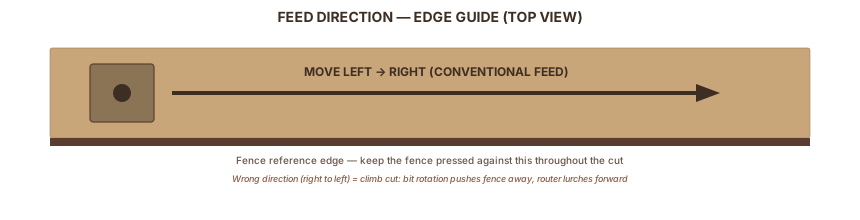
Router bits spin clockwise viewed from above. The rule: move the router so the bit's rotation PULLS the fence against the board, not away from it.
For cuts along the near edge of a board (fence on your side): move LEFT to RIGHT.
Correct direction feels like slight resistance. The fence presses into the board as you push forward. The wrong direction, called a climb cut, makes the router lurch forward and the fence pull away. That lurch is your signal to stop and reverse.
One exception: a brief 2–3" climb cut at the start of an exit corner removes fragile grain before the main pass blows it out. Make that short passage first, then reverse to conventional feed for the full cut. As Woodworkers Journal notes in their router tearout guide, this technique is most useful on cross-grain cuts in hardwood where the exit corner is vulnerable.
Depth Per Pass
Never rout deeper than 1/4" in one pass. For a 3/8"-deep dado in 3/4" plywood: two passes at 3/16" each. Set the depth stop to 3/16", rout the full length, then increase to 3/8" and rout again.
Use 1/8"-per-pass for figured wood or any time you're seeing tearout. WoodWorkers Guild of America's edge guide tutorial shows that shallower passes with a sharp bit produce cleaner dadoes than deeper single passes.
Practical Example: Cutting a Dado for a Shelf
A 3/4" plywood shelf requires a 3/4"-wide, 3/8"-deep dado.
- Mark both edges of the dado on the workpiece.
- Set the edge guide so the bit's near edge aligns with the near side of the dado. Rout at 3/16" depth.
- Shift the fence so the bit's far edge aligns with the far side of the dado. Rout at 3/16" depth.
- Return to both fence positions and rout again at 3/8" depth to clean the bottom.
For a one-pass dado using a bit that matches your shelf thickness exactly: set the fence once, two depth passes.
RELATED: How to Cut a Dado Cutting dadoes for shelves and cabinet backs? The dado cut guide covers table saw and router methods with specific setup tips.
Part 3: Straight-Edge Clamp Guides
The edge guide tops out at 4–6" from the board's edge. For a dado across the middle of a 24"-wide panel, you need a straight-edge clamp guide.
The Offset Problem
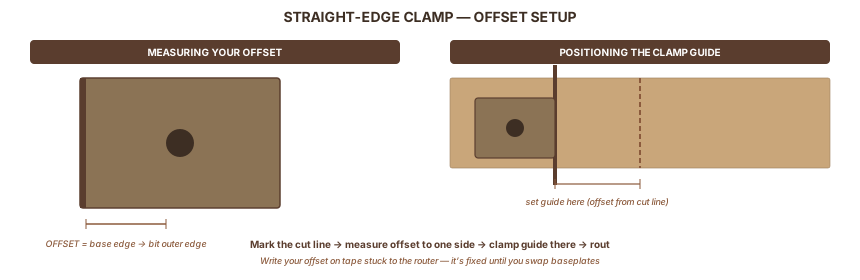
The router bit sits somewhere in the middle of the base, not at the edge. To rout a precise cut line, place the clamp guide offset from that cut line by exactly the distance from the bit to the near edge of the router base. This offset is what makes the cut land where you intend.
Measure your offset once and write it on tape stuck to your router. It doesn't change unless you swap baseplates.
How to measure: Unplug the router. Install the bit. Hold a ruler on the workpiece surface, touching the near edge of the router base. Read the distance from that base edge to the bit's outer edge. That's your offset, typically 2" to 3-1/2" depending on the router model.
Setup Steps
- Mark the cut line on the workpiece.
- Measure the offset distance to one side of the cut line (toward the guide side). Mark the offset line.
- Clamp the straight-edge along the offset line. Space clamps every 18" or closer.
- Do a dry run (router off) to confirm the bit aligns with your cut marks at both ends.
- Rout from left to right, keeping the router base pressed against the guide throughout.
Options
| Option | Cost | Best for |
|---|---|---|
| Shop-made (straight plywood edge) | ~$0 | Occasional use; test the edge with a level first |
| Bora Clamp Edge (aluminum) | ~$30 | Regular use, sheet goods |
| Woodpeckers Clamp-N-Guide | ~$60 | High-precision work |
| Festool guide rail | ~$150+ | Pro or frequent use |
A shop-made guide from 3/4" plywood works for occasional dados if the edge is genuinely straight. After a few projects, the Bora Clamp Edge at $30 is worth it. Aluminum doesn't warp or deflect under router pressure.
RELATED: Router Jig Guide Want to build a custom T-square dado jig or other shop-made router accessories? The router jig guide covers that.
Part 4: Guide Bushings and Template Routing
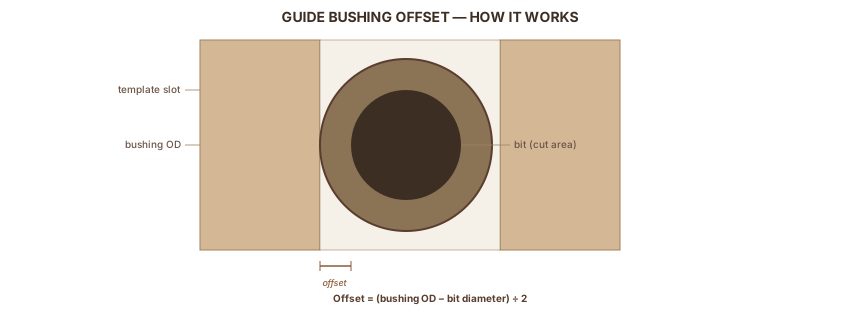
A guide bushing mounts in the router's baseplate and surrounds the bit. The bushing's outer wall rides along a template; the bit cuts through the center. Build the template once, and the router follows it for every piece.
The Offset Calculation
Because the bushing is wider than the bit, the cut lands slightly inside the template edge. You must account for this offset when making the template:
Offset = (bushing outside diameter − bit diameter) ÷ 2
Example: 3/4" OD bushing, 1/2" bit → (0.75" − 0.50") ÷ 2 = 1/8"
Wealden Tool's guide bush offset reference shows how this offset affects template sizing:
- Routing inside a template (mortise, inlay pocket): make the template opening LARGER than the desired cut by the offset on each side. For a 1/2"-wide mortise with a 1/8" offset: the template slot must be 3/4" wide (1/2" + 1/8" + 1/8").
- Routing outside a template: make the template SMALLER than the desired finished size by the offset on each side.
Always test on scrap first. Misreading inside vs. outside wastes the template material.
Centering the Bushing
If the bushing sits off-center, the offset varies depending on which side of the template the bushing contacts. Katz-Moses Tools' guide bushing tutorial recommends using the alignment pin that comes with many bushing kits. Plunge the bit through the bushing and verify the gap is even all around. If not, adjust the baseplate screws until centered.
When to Use a Bushing vs. a Flush-Trim Bit
For templates with a single straight reference edge, a flush-trim or pattern bit (bearing rides the template) produces the same result without offset math. Choose the bushing when:
- The bit has no bearing option (dovetail bits, for example)
- You're using a dedicated jig like a dovetail jig that requires a specific bushing size
- You want to swap bit sizes while reusing the same template
The Lee Valley primer on router template guides covers the full range of bushing sizes and which bits pair with each.
RELATED: Router Templates Guide bushings are the core of template routing. The router templates guide covers offset calculations, template materials, and how to build your first template.
RELATED: Dovetail Jig Guide Dovetail jigs use guide bushings with specific bit sizes. The dovetail jig guide explains the setup, bushing selection, and how to dial in tight joints.
Part 5: Troubleshooting Router Guide Problems
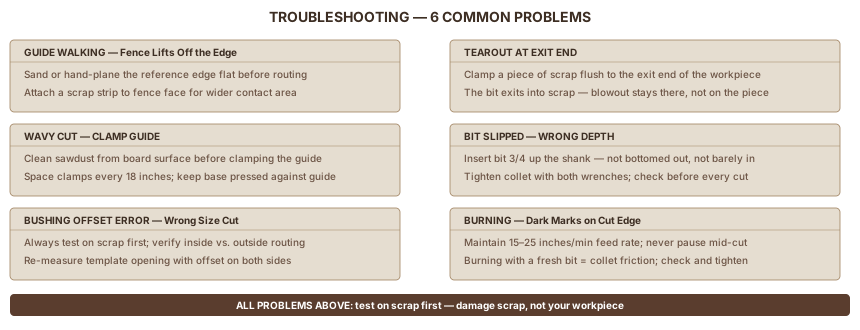
Guide Walking: Fence Lifts Off the Edge
What you see: The cut drifts or widens; the fence wasn't pressed against the board throughout.
Why it happens: The board's edge has rough spots, mill marks, or a slight bow. The metal fence face has a small contact area that rocks on any irregularity.
Fix: Sand or hand-plane the reference edge flat before routing. Attach a strip of straight scrap to the metal fence face (hot-glue or screw it on) to increase contact area. Maintain firm lateral pressure throughout the pass, not just forward pressure.
Tearout at the Exit End
What you see: A chip or blowout at the far end of the cut, where the bit exits the wood.
Fix: Clamp a piece of scrap flush to the exit end of the workpiece before routing. The bit exits into the scrap; the blowout stays there. This fix costs one scrap piece and 30 seconds.
Wavy Cut with a Clamp Guide
What you see: The straight-edge produces a groove that wanders slightly.
Why it happens: The router base lost contact with the guide mid-pass, or the guide shifted.
Fix: Clean sawdust from the workpiece surface before clamping. Even small chips lift the guide. Space clamps every 18". Keep the router base pressed against the guide throughout the pass without lifting.
Bit Slipped: Wrong Depth
What you see: The cut is deeper or shallower than set, inconsistently along the cut.
Fix: The bit can slip in the collet if not tightened correctly. Insert the bit 3/4 of the way up the shank. Avoid bottoming it out (which causes binding) and avoid barely inserting it (too little shank gripping area). Tighten the collet firmly with both wrenches.
Guide Bushing Offset Error
What you see: Template routing produces a shape consistently larger or smaller than expected.
Fix: Always test on scrap before touching the good stock. Verify whether you're routing inside or outside the template. The offset math inverts between the two. Re-measure the template slot or shape, accounting for the offset on each side.
Burning
What you see: Burn marks along the cut edge; sometimes visible darkening of the wood.
Why it happens: Dull bit, too slow a feed rate, or too deep a pass.
Fix: Keep moving at a consistent pace, 15 to 25 inches per minute for most materials. If burning appears with a fresh bit and shallow passes, the bit may be rubbing on exit rather than cutting. Check that the collet releases cleanly after the cut.
FAQ
How far from the edge can the built-in router edge guide reach?
The edge guide that ships with most routers reaches 4 to 6 inches from the board's edge. The limiting factor is rod length — the two steel rods that thread into the router base. For cuts more than 6 inches from the edge, switch to a straight-edge clamp guide clamped directly to the workpiece.
What is the guide bushing offset formula?
Offset = (bushing outside diameter − bit diameter) ÷ 2. Example: a 3/4" OD bushing with a 1/2" bit produces a 1/8" offset. Account for it by making template openings larger than the desired cut when routing inside (mortise, inlay pocket) or smaller when routing outside. Always test on scrap before the real piece.
Which direction should I move the router when using an edge guide?
Move left to right when the fence rides the near edge of the board. Router bits spin clockwise, so this direction pulls the fence into the board and keeps it seated throughout the cut. Moving right to left is a climb cut — the bit rotation pushes the fence away and the router can lurch forward unexpectedly.
How do I stop tearout at the end of a routed cut?
Clamp a piece of scrap flush to the exit end of the workpiece before routing. The bit exits into the scrap; any blowout stays there, not on your piece. This takes 30 seconds and costs one offcut — it's the single most effective tearout fix for any router guide setup.
Sources
Sources include manufacturer technical references, educational woodworking publications, and practitioner guides that informed the procedures, offset formula, and troubleshooting sections.
- WoodWorkers Guild of America — Edge Guide for Dadoes — edge guide procedure and feed direction
- Wealden Tool — Guide Bush Offset Formula — authoritative offset calculation with examples
- Katz-Moses Tools — Guide Bushings 101 — bushing anatomy, centering, best uses
- Woodworkers Journal — Prevent Router Tearout — six tearout prevention techniques
- Lee Valley Tools — Router Template Guides — template guide system overview
- Popular Woodworking — Router Bushing Calculator — offset calculation reference
- Toolsradar — Edge Guide Mastery — edge guide overview
- Bora Tool — Router Dado Guide — commercial clamp guide reference
- Woodpeckers — Clamp-N-Guide — clamp guide system reference
- Rockler — Cutting a Rabbet with Piloted Bit — rabbeting bit as edge-guide alternative
Tools Used
Also Referenced
Tagged
How We Research
We don't take affiliate revenue or accept review units. Picks come from multi-source research — manufacturer specs, OSHA / EPA / ASTM regs, and long-form practitioner threads — plus Ahmed's hands-on use where relevant. When we recommend something, we explain why.
Up Next
How to Use Router Templates
POWER TOOLS · Beginner