
Router Tables at a Glance
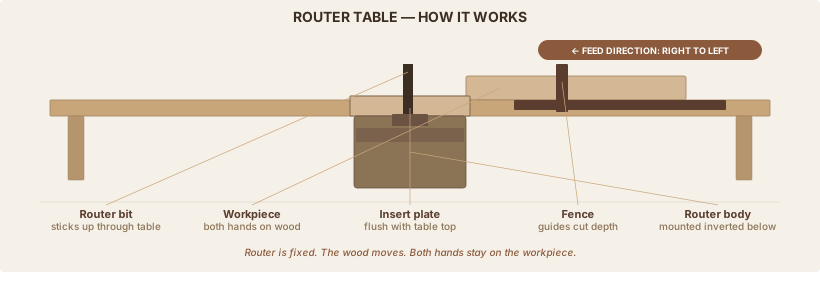
A router table mounts your router upside-down beneath a flat work surface so the bit points up and you slide the wood across it, both hands on the workpiece. For beginners: buy the Bosch RA1181 ($260) and pair it with the Bosch 1617EVSPK router ($300). That's the complete beginner setup at ~$600 with bits. It's the setup woodworking forums and publications recommend most.
| Best beginner table | Bosch RA1181 (~$260) |
| Best router for table use | Bosch 1617EVSPK combo (~$300) |
| Minimum router HP | 1.75 HP light work; 2.25 HP recommended |
| Feed direction | Always right to left |
| Budget all-in-one | SKIL RT1323-01 (~$220, table + router included) |
| Surface material | Aluminum (best), phenolic (excellent), MDF (adequate) |
In this guide:
- Benchtop, floor-standing, or table-saw wing: which type fits your shop
- Which router to mount and why HP and variable speed matter
- Budget tiers and specific tables at each price point
- Setup, first cuts, and the safety rules that prevent injury
Part 1: What a Router Table Does (and Whether You Need One)
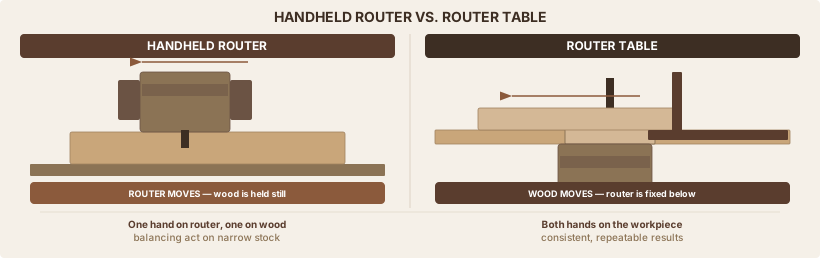
A handheld router: one hand on the body, one on the handle. The router moves, the wood sits still. The base has to balance on the edge of the workpiece at 22,000 RPM. On a 2-inch-wide piece, there's barely anything for it to rest on.
A router table flips that. The router is bolted upside-down beneath the table with the bit pointing up. Both hands are on the wood. The fence guides the cut. The full table surface supports the workpiece regardless of how narrow it is.
That's the practical difference: a router table gives you two-handed control and consistent results. Your tenth piece looks the same as your first.
What a router table makes possible that a handheld router can't:
- Routing narrow stock (no baseplate support issue)
- Running large-diameter profile bits (raised panel bits, large cove bits) that are unsafe in a handheld router
- Repetitive production: identical results across a run of cabinet doors, shelf edges, or drawer fronts
- Edge jointing narrow stock with an offset fence setup
- Cope-and-stick cabinet door frames (the bits are too large to run handheld)
What the handheld router still does better:
- Large panels that can't be moved to a table
- Stopped grooves and plunge mortises starting in the middle of a surface
- Template tracing on large, irregular pieces
- On-site work
The router table doesn't replace the handheld. They do different jobs. You'll use both.
When to skip the table for now:
You can start woodworking for months or years with only a handheld router. Add a table when you find yourself routing narrow stock repeatedly, making multiple identical pieces, or wanting to cut raised panels. If you're doing one-off projects with 3/4" or wider stock, a handheld router gets you there.
Part 2: Three Types of Router Tables
Benchtop Tables
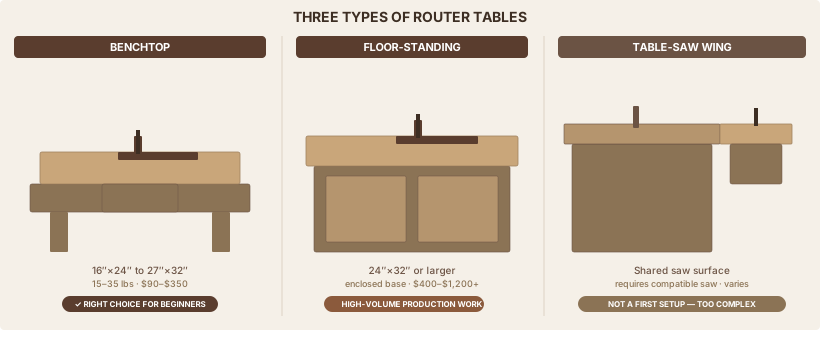
Sit on a workbench, 16"×24" to 27"×32" surface, 15–35 lbs. Price range: $90–$350.
Portable, storable, adequate for every operation a beginner will encounter and most of what an intermediate woodworker needs. Stores on a shelf when not in use. Important if you're in a small garage or shared space.
This is the right choice for beginners. The Bosch RA1181, Kreg PRS2100, and SKIL RT1323-01 are all benchtop models.
Floor-Standing Tables
Self-supporting on legs with an enclosed cabinet base. Surface typically 24"×32" or larger. Price range: $400–$1,200+.
More mass means less vibration. The enclosed cabinet helps with dust collection. Requires permanent floor space.
For dedicated woodworkers doing high-volume production work. Not the right first router table.
Table-Saw-Wing Setup
Router installed in an extension wing of a table saw. Shares the saw's large, stable surface (often cast iron) and saves floor space.
Requires a compatible table saw, more complex integration, and the fence systems can conflict. Working height is fixed at table-saw height.
Don't start here. Too many variables for a first setup, and it requires a table saw you might not have yet. If you want a look at the table saw side of the equation, see Table Saw Essentials.
Part 3: Which Router to Mount
The HP Question
1.75 HP: Works for basic edge profiling (roundovers, chamfers) and smaller bits. The SKIL RT1323-01 kit includes a 1.75 HP router. It gets you started.
2.25 HP: The real minimum if you want to grow. Handles larger profile bits, joinery bits, and can cut raised panels with vertical bits without bogging down. The Bosch 1617EVS and DeWalt DW618 are both 2.25 HP. Most woodworking publications and forum veterans recommend 2.25 HP as the target for a dedicated router table.
3+ HP: The Porter-Cable 7518 at 3.25 HP is a classic production workhorse. Overkill for beginners and now discontinued, though widely available used.
Variable Speed: Not Optional
Bit diameter controls how fast a router can safely spin. Larger bits must run slower. In Pro Tool Reviews' router bit speed guide, the safe RPM ranges by bit diameter are:
| Bit Diameter | Max Recommended RPM |
|---|---|
| Up to 1" | 24,000 RPM |
| 1¼"–2" | 18,000 RPM |
| 2¼"–2½" | 16,000 RPM |
| 3"–3½" | 12,000 RPM |
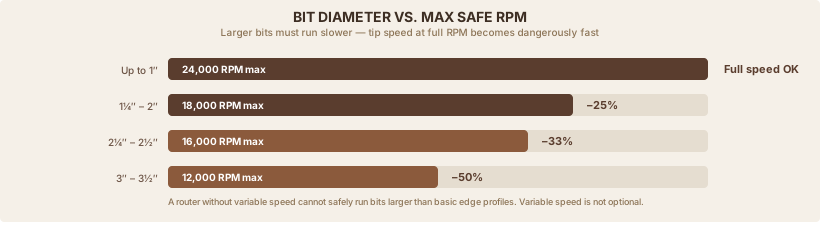
A 3" raised-panel bit at full speed has an edge moving faster than 17,000 feet per minute. A router without variable speed can't safely run anything larger than basic edge bits.
Fixed vs. Plunge Base
Fixed base is preferred for table use. It stays in the table permanently; you just drop the motor in and out. Simpler, more stable.
The best setup: a combo kit with a fixed and plunge base. One motor lives in the table, the other base is for handheld work. The motor swaps between them in 30 seconds. You get both a table router and a handheld router from one purchase.
Recommended Routers
Bosch 1617EVSPK — The recommendation. 2.25 HP, 8,000–25,000 RPM variable speed with soft start, Constant Response Circuitry that holds consistent speed under load. Comes with fixed base, plunge base, edge guide, and hard case. Above-table height adjustment when used with the Bosch RA1181. Fits most aftermarket router lifts. Price: ~$280–$350 for the combo kit.
DeWalt DW618PK — Solid alternative. 2.25 HP, 8,000–24,000 RPM, micro-fine depth adjustment ring (1/64" increments). Some users report minor vibration that can loosen table mounting hardware over time; check and re-tighten the mount after the first few sessions. Price: ~$200–$280.
SKIL RT1323-01 included router — Adequate for the table it ships with. 1.75 HP, variable speed. Fine as a starting point; upgrade when you want to run raised-panel bits.
Part 4: Budget Tiers and Recommendations
| Setup | What you get | Approx. cost |
|---|---|---|
| Budget all-in-one | SKIL RT1323-01 (table + 1.75 HP router) | ~$220 |
| Budget table only | Ryobi A25RT03 (if you own a compatible router) | ~$90–$150 |
| Best beginner complete | Bosch RA1181 + Bosch 1617EVSPK + starter bits | ~$600–$650 |
| Stepping up | Rockler Phenolic + Bosch router + bits | ~$800 |
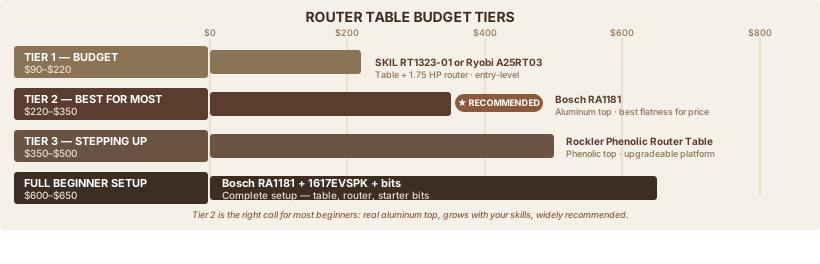
Tier 1 ($90–$220) — Getting Started
SKIL RT1323-01 (~$219) — The best entry-level choice if you have no router. One purchase, one box, plug in and start routing. 24" aluminum fence, above-table bit height adjustment, 5 insert plates. The included 1.75 HP router handles edge profiling and basic joinery. You'll outgrow it when you want to cut raised panels, but it's a real router on a real table.
Ryobi A25RT03 (~$90–$150) — The biggest surface in the budget tier (32"×16") if you already own a compatible router. MDF top with aluminum T-track fence and vacuum port. Verify your router fits before buying — "universal" compatibility isn't always universal.
Tier 2 ($220–$350) — Best for Most Beginners
Bosch RA1181 (~$260) — The recommendation for most beginners. The aluminum top is the best material in this price range for long-term flatness — it doesn't absorb humidity or deflect the way MDF does. Featherboards included. Complete out-of-the-box setup. Bob Vila's tested router table guide and Pro Tool Reviews both name it the top beginner pick. The fence alignment takes patience to dial in on first setup, but once it's set, it holds.
Kreg PRS2100 (~$299) — Best insert plate system in the price range. The leveling mechanism is particularly well-executed, and the plate sits flush and stays flush. Slightly smaller surface than the RA1181 for similar money. Choose this if you plan to add a router lift later — the plate system is designed to work with aftermarket lifts.
Tier 3 ($350–$500) — Stepping Up
Rockler Phenolic Router Table (~$350–$450 depending on configuration) — Phenolic top is more durable and flatter than MDF, impervious to water and humidity. Highly upgradeable: add a JessEm lift, a ProMax fence, an enclosed stand. Designed to grow with your skills. For woodworkers who know they'll be at the router table regularly and want a platform that doesn't need replacement.
Part 5: Setting Up Your Router Table
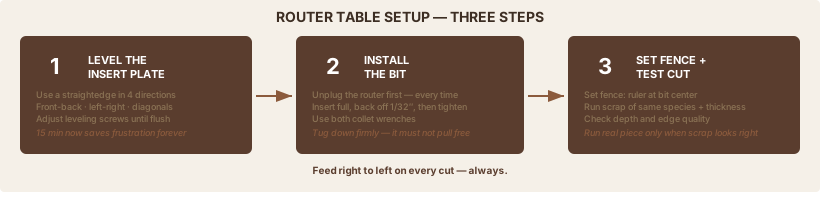
Installing and Leveling the Insert Plate
Most beginners skip this step. It's the one that causes the most frustration later. A plate that sits 1/32" high catches every workpiece and changes feed pressure midway through a cut.
- Attach the router to the insert plate using the router base as a mounting template (4 screws through the plate into the router base)
- Drop the plate into the table opening
- Using a straightedge, check in four directions: front-to-back, left-to-right, and both diagonals
- Adjust the four leveling screws until the plate is flush with the table surface on all four checks
- Re-check after your first routing session — heat and vibration can settle things slightly
Spend 15 minutes getting this right. It pays off on every cut after it.
Installing a Bit
- Unplug the router
- Insert the bit shank fully into the collet, then pull back 1/32" before tightening — this prevents the bit from bottoming in the collet and allows for heat expansion
- Use both collet wrenches: one holds the spindle, one tightens the collet nut
- Give the bit a firm tug downward to confirm it's locked; it should not pull free
Setting the Fence and Your First Cut
- Loosen the fence knobs. Place a ruler across the bit center and set the fence to the desired depth.
- For full-profile cuts (bit removes the entire edge), center both fence faces around the bit opening.
- For partial cuts (fence is the depth stop), position one fence face flush with the outer edge of the bit.
- Lock the fence. Run a test piece on scrap of the same thickness as your project wood.
- Check depth, check edge quality, adjust if needed.
- When the scrap looks right, run the actual piece.
Feed right to left. Every time. The bit spins counter-clockwise viewed from above, so right-to-left feeds against the rotation. Left-to-right (a "climb cut") lets the bit grab the workpiece and throw it. This is the single most common cause of router table kickback.
Part 6: Five Operations Beginners Use Most
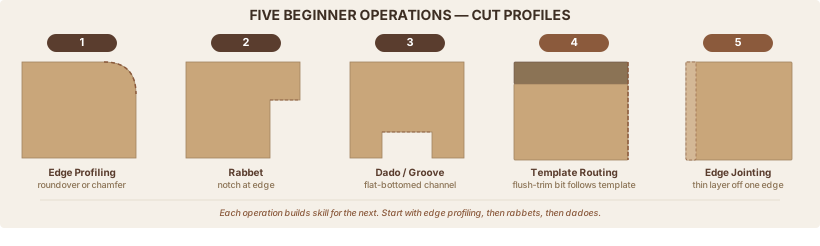
1. Edge Profiling (Roundovers and Chamfers) The most common first operation. A roundover bit or chamfer bit removes the sharp edge from a finished piece. Set bit height to the profile depth, set the fence to expose the desired portion of the bit, feed right to left. Great for learning consistent feed rate and building muscle memory.
2. Rabbets A notch cut along the edge of a board — used for cabinet backs, drawer backs, and frame-and-panel construction. A rabbeting bit with a pilot bearing controls the width; just set the height and run the piece. No fence needed with a bearing-guided bit.
3. Dadoes and Grooves Flat-bottomed channels cut with a straight bit. Dadoes run across the grain for shelves; grooves run with the grain for drawer bottoms and panel slots. As covered in Dados, Rabbets & Grooves, multiple passes with the fence shifted between passes lets you cut a wider channel than the bit diameter.
4. Template Routing Attach a plywood or MDF template to the workpiece, then run a flush-trim bit along it. The bearing rides against the template; the bit cuts the workpiece to match exactly. Produces consistent, identical parts — bracket shapes, cabinet door rails, curved legs.
5. Edge Jointing An offset fence setup approximates a jointer for narrow stock: shim the outfeed fence face slightly forward of the infeed face (1/32"–1/16"), and a straight bit removes a thin layer, leaving a straight, flat edge. Not a substitute for a real jointer on rough lumber, but useful for cleaning up slightly bowed edges on narrow pieces.
What you're working toward: Cope-and-stick cabinet door frames. These matched bit sets cut both the profile on the stile and the mating notch on the rail. They require at minimum 2.25 HP, careful fence setup, and consistent stock thickness. Most beginners reach this after several months of profiling and joinery work.
Part 7: Safety and Common Mistakes
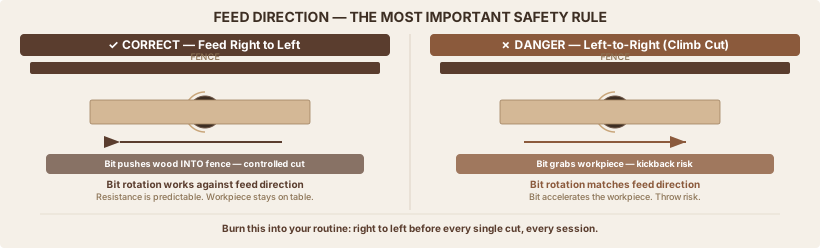
The Rules That Prevent Injury
Feed right to left. The most important rule. Feeding left-to-right lets the bit grab and throw the workpiece. Make it a reflex: before every cut, verify your feed direction.
Match bit diameter to RPM. Refer to the speed chart above. Large bits at full speed vibrate dangerously and cut poorly. Set the speed dial before you power on.
Take shallow passes. Remove 1/4" or less per pass. For full profile bits, make two or three passes approaching final depth. Fine Woodworking's router table safety guide and Katz-Moses' table safety tips both emphasize this as a primary injury-prevention rule.
Unplug for all bit changes. Every time. No exceptions.
Use featherboards. They maintain consistent pressure against the fence and keep the workpiece on the table. Without them, narrow pieces can lift or shift mid-cut.
No small pieces freehand. If the workpiece is too small to push safely without your fingers near the bit, shape a larger piece and cut it to size after routing.
PPE: Safety glasses, hearing protection (routers run 85–100 dB), and a dust mask even with vacuum collection running. Router dust is among the finest particles in the shop and the most dangerous to inhale. If you don't have a collection system yet, the DIY dust collector guide covers building one for under $100.
Common Mistakes
Wrong feed direction. The dangerous one. Burn this into your routine: right to left before every cut.
One deep pass instead of multiple shallow ones. Burns the wood, strains the motor, increases kickback risk. Two or three passes is not slower when you factor in sanding out the burn.
Skipping the insert plate leveling. The 15 minutes you spend leveling the plate at first setup saves you from mediocre cuts on every project after.
Running large bits at full speed. Check the diameter of the bit, look up its maximum RPM, set the dial before powering on.
Cheap bits. A 50-piece discount set has inconsistent geometry, dulls quickly, and burns wood on every pass. Per Infinity Cutting Tools' bit recommendations, buy five quality bits instead: a 1/4" roundover, a 1/2" straight with 1/2" shank, a 45° chamfer, a rabbeting bit with a bearing set, and a flush-trim bit. Freud, Whiteside, and Infinity all make excellent bits in the $20–$50 range per bit.
Skipping the test cut. Always run a test piece on scrap of the same species and thickness before routing the actual workpiece. Per Woodsmith's edge profiling guide, sneaking up on the final profile in two passes on scrap is the standard method, not a beginner shortcut.
Where This Fits
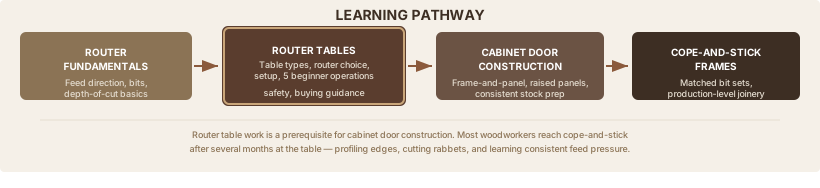
Read first: Router Fundamentals covers feed direction, bit selection, and depth-of-cut rules that apply to both handheld and table work. That guide is still in development — the safety rules in this guide cover the table-specific essentials in the meantime.
Related: Dados, Rabbets & Grooves explains the joints a router table makes best. Router Bits for Wood covers bit quality, carbide grades, and the 5 starter bits that work at a router table. For handheld router work, a circle jig cuts perfect circles the router table can't — round tabletops, speaker baffles, and lazy susans.
What this unlocks: Once you're comfortable at the router table, the next step is cabinet door construction — cope-and-stick frames and raised panels. That's where router table work reaches production-level usefulness and starts to look like furniture.
Sources
Research for this guide drew on tested reviews, manufacturer documentation, woodworking publications, and practitioner communities.
- Bosch RA1181 product page — Home Depot — price and specification verification
- Bosch 1617EVSPK official page — router specs and compatibility
- Bob Vila — Best Router Tables (tested) — tested recommendations and beginner picks
- Pro Tool Reviews — Best Router Tables — comparative reviews and rankings
- Pro Tool Reviews — Router Bit Speed Chart — RPM recommendations by bit diameter
- Fine Woodworking — 12 Tips for Router Table Safety — safety rules and kickback prevention
- Katz-Moses — Router Table Safety — table-specific safety rules
- Rockler — Router Table Basics — technique overview
- Kreg PRS2100 official page — specifications and features
- SKIL RT1323-01 official page — kit specifications
- DeWalt DW618 — Lowe's — router specifications and price
- Woodcraft — Router Table Basics — setup guidance
- Woodsmith — 7 Tips for Routing Perfect Edge Profiles — technique guidance
- Infinity Cutting Tools — The 6 Most-Used Router Bits — starter bit recommendations
Tools Used
Also Referenced
How We Research
We don't take affiliate revenue or accept review units. Picks come from multi-source research — manufacturer specs, OSHA / EPA / ASTM regs, and long-form practitioner threads — plus Ahmed's hands-on use where relevant. When we recommend something, we explain why.
Up Next
Choosing Your First Wood Router
POWER TOOLS · Beginner